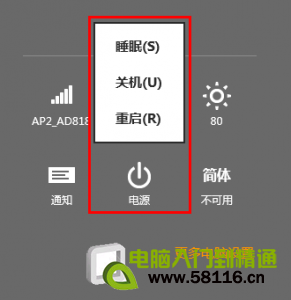
Windows 8 原生關機需 4 步驟(Charms→設定→電源→關機),較 Win7 多兩步。建立桌面捷徑並釘選開始畫面可縮減為單點操作:
shutdown.exe -s -t 00
-r -t 00
-h
捷徑參數說明:-s 關機、-r 重開機、-t 00 延遲 0 秒立即執行、-h 休眠、-f 強制關閉應用程式。可依需求組合建立多枚捷徑磚。
-s
-r
-t 00
-f
Windows 8 啟用資料夾核取方塊:多選檔案更輕鬆
Win8 快捷鍵大全:常規操作、IE10、檔案總管三大分類完整收錄
Win8.1 Wi-Fi 受限/無法連線修復:啟用 FIPS 相容性解決掉線
從 Windows Store 應用程式商店升級 Windows 8.1 完整圖文教學
Win8.1 無法安裝 KB2904440 提示「不適用您的電腦」:語言/位元版本不符或更新不適用
Win8 內建 IIS 架設 FTP 伺服器完整圖文教學
Win8 系統更新失敗錯誤 0X8DDD0007 註冊表修復法
Win 8 替代預設輸入法設定:控制台進階設定一鍵指定預設 IME