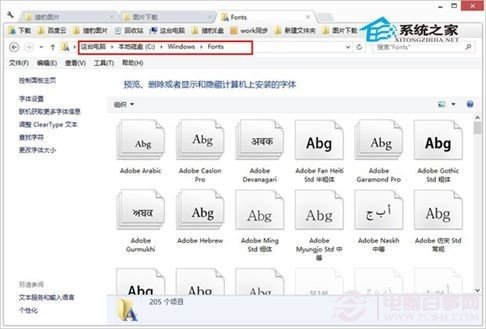
Win8 安裝第三方字體極簡兩法:
.ttf
.fon
C:\Windows\Fonts
驗證:打開 Word/PS 等編輯器,字體下拉列表即見新增字體。Win7/8/8.1/10/11 通用。建議從可信網站下載字體,避免惡意文件偽裝。
Windows 8.1 預覽版啟用「上帝模式」完整教學(重複文章)
Windows 8 調整工作列圖示大小:切換大/小圖示模式
Windows 8 關機自動清除磚快取保護隱私:群組原則啟用「登出時清除磚通知與歷程記錄」
Windows 8 組合鍵大全:鍵盤、滑鼠、觸控三模操作速查表,玩轉 Metro 與傳統桌面
Win8 最快開啟控制台:「這台電腦」右鍵兩步走
Win8 任務列變雙行兩大招:新增工具列資料夾、安裝 Bins 堆疊圖示
Windows 8 ATI/AMD 顯示卡如何調整縮放模式?Catalyst Control Center 進階檢視設定全螢幕/保持比例/置中
Win8.1 更新後 IE11 無法開啟?登錄權限修復與 sfc 掃描雙管齊下