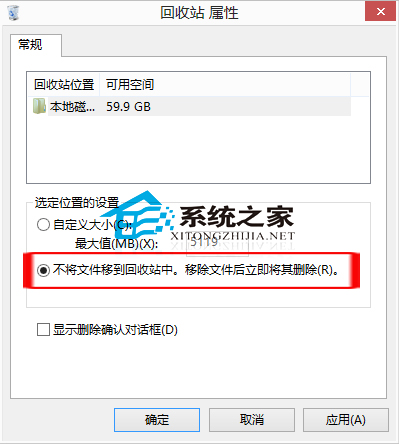
選取檔案 → 同時按 Shift+Delete → 永久刪除,不進回收站。
清空回收站無聲音提示,可在「控制台」→「聲音」→「程式事件」→「清空回收站」設定音效。
Win8 選擇四種 Windows Update 自動更新模式完整說明
Win8 工作管理員新特性深度解析:簡易模式、熱度圖、進程分組
系統巧妙設定讓 Windows 8 開機更快:msconfig 與啟動項管理
Win8 隱藏控制台指定項目:使用群組原則編輯器精簡控制台介面
Win8 查看 Nvidia 顯卡資訊:桌面右鍵開啟 Nvidia 控制台 → 左下角系統資訊查看顯存與位寬
Win8.1 Modern 應用 (Metro App) 下如何顯示工作列?Win+T 快捷鍵或滑鼠移至底部喚出
Win8 開啟 Aero 玻璃透明效果:高對比度主題 + 色彩視窗保持 + 切回預設主題存檔
Windows 8 雲端整合體驗:SkyDrive 讓檔案、照片、設定跨裝置無縫同步