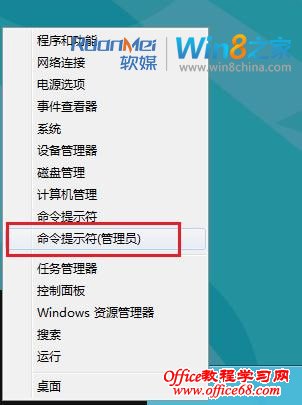
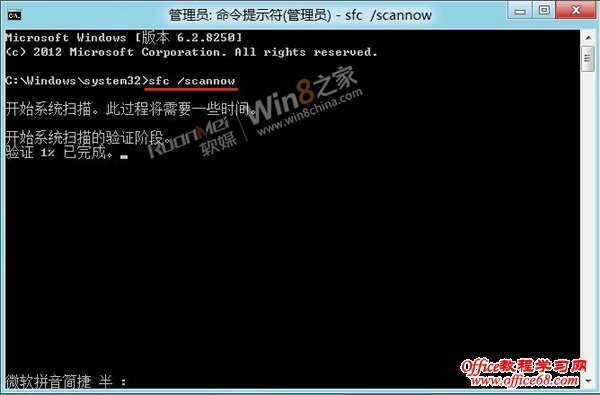
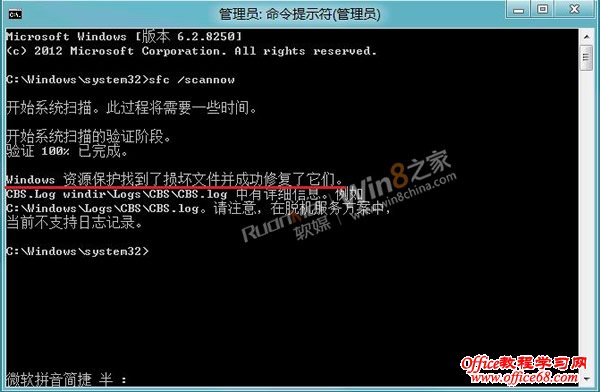
sfc /scannow
C:\ProgramData\Microsoft\Windows\Start Menu\Programs
SFC 掃描可修復損毀的系統檔案,是找回遺失商店最直接的方法。
Windows 8 新增/移除輸入法(中文/英文/日文/注音/拼音等)
Win8 無法安裝 .NET Framework 3.5?DISM 指令離線安裝 sxs 來源解決
Win8/8.1 變更電源計畫設定:控制台 → 電源選項 → 變更計畫設定 → 進階電源設定
Win8.1 開機出現「其他使用者」帳號?修正自動登入設定解決
Win8.1 開機直接進入傳統桌面:導覽設定啟用法
Win8 SkyDrive 應用常見問題解答:共享、上傳下載、跨應用開啟、搜尋
Win8.1 IE11 將網站釘選到開始畫面:磚動態更新即時資訊、無數量限制可分組管理
Windows 8.1 Update 降級回 Windows 8.1 完整步驟