Windows 8 應用程式商店下載應用程式出現錯誤 0x80073CF9,嘗試建立 auinstallagent 資料夾無效。以下綜合修復步驟:
Cmd /c ren %systemroot%\System32\Spupdsvc.exe Spupdsvc.oldC:\Windows\System32 確認 Spupdsvc.exe 是否存在,存在則手動重命名為 Spupdsvc.old。sfc /scannow 掃描修復。C:\Windows 建立 AUInstallAgent 資料夾,或在 C:\Program Files 建立 WindowsApps 資料夾,或在 C:\Windows 建立 AppReadiness 資料夾。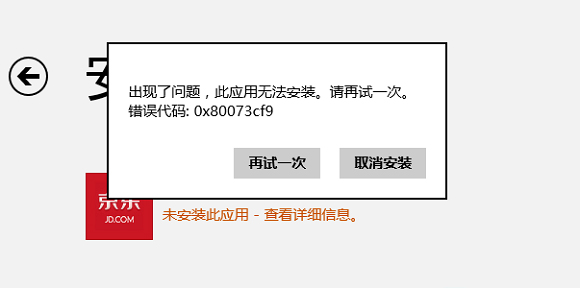
Spupdsvc.exe 為舊版服務更新檔,可能干擾新版應用程式商店部署流程。重命名並配合 sfc /scannow 修復系統檔案,通常能解決此錯誤。