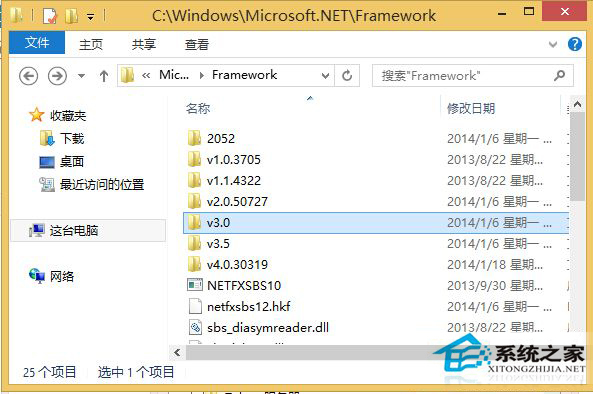
Windows 8 判斷是否安裝 .NET Framework 3.5+:開啟 C:\Windows\Microsoft.NET\Framework 資料夾,若存在 v3.5 資料夾即表示已安裝 3.5 版 (含 2.0/3.0)。
C:\Windows\Microsoft.NET\Framework
v3.5
此法適用於 .NET Framework 3.0 以上版本檢查。若軟體提示需安裝 .NET,可至微軟官網下載對應版本離線安裝包。
Windows 8 設定高對比度顯示三種方法:輕鬆存取中心、快捷鍵、控制台
Windows 8.1 找不到「我的電腦」?教你輕鬆喚回桌面圖示
Win8.1 並排開啟多個 Metro 應用:最多 4 個同時顯示,拖曳分割螢幕靈活調整
Windows 8 開啟隱藏迷你開始選單 (Win+X) 功能詳解
安裝 Win8 系統時如何跳過「正在安裝應用程式」階段?Ctrl+Alt+Del 直接進入桌面
Win8 開啟 Aero 玻璃透明效果:高對比度主題 + 色彩視窗保持 + 切回預設主題存檔
Windows 8 修改系統字體工具 MacType 使用教學 (含載入模式、進程管理、字體選擇)
Win8.1 程式庫在哪裡?找回檔案總管隱藏的程式庫功能圖文教學