Windows XP Windows 7 Windows 2003 Windows Vista Windows 綜合教學 Linux 系統教學
Windows 10 Windows 8 Windows 2008 Windows NT Windows Server 電腦軟體教學

Windows 8.1 啟動金鑰備份與還原完整教學:工具法與手動法

編輯:Win8 系統基礎知識

重裝系統前備份啟動金鑰可避免遺失正版授權。提供「Windows 8 啟動備份還原工具」一鍵法與手動複製系統檔案法兩種方案。
方法一:工具備份(推薦新手)

  1. 下載「Windows 8 啟動備份還原工具」(2 KB)。
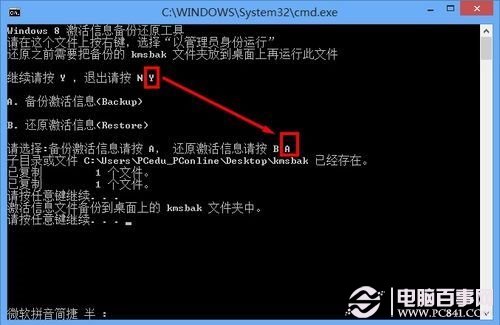
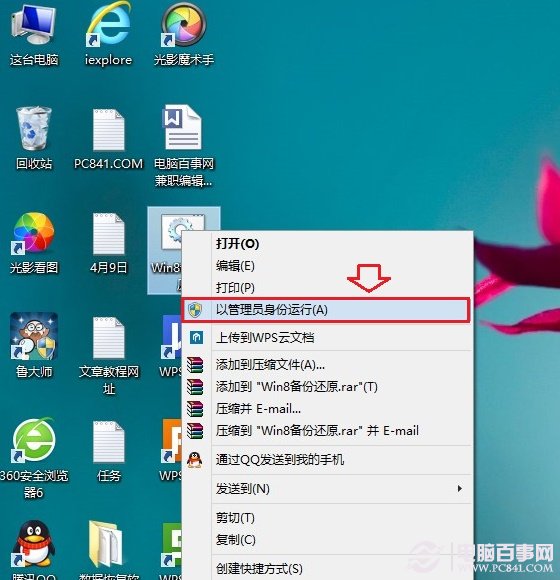
  2. 右鍵以「系統管理員身分執行」。
  3. 輸入 A → Enter 備份,桌面產生備份檔,建議存至 USB/雲端。
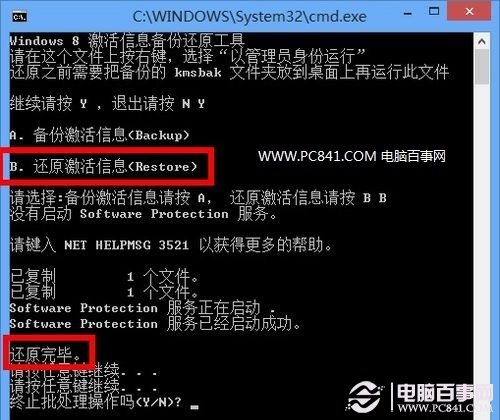
  4. 還原時:重裝系統後,將備份檔放回桌面,同樣以管理員執行工具,輸入 B → Enter 即可還原啟動。
工具介面 管理員執行 備份操作 還原操作

方法二:手動備份

  1. 最簡單:保存購買時的產品金鑰字串。
  2. 進階:複製 C:\Windows\System32\spp\store\2.0 整個資料夾(含 cache、data.dat、tokens.dat)備份。

手動還原步驟

  1. 服務中停止「Software Protection」。
  2. 將備份檔案覆蓋回 C:\Windows\System32\spp\store\2.0。
  3. 管理員命令提示字元執行 slmgr.vbs -ipk <金鑰>。
  4. 重開機完成啟動還原。

專業版含媒體中心版需先用試用金鑰 GBFNG-2X3TC-8R27F-RMKYB-JK7QT 升級再還原。若權限問題,需給 NT SERVICE\sppsvc 完整控制權限。

適用 Win8 核心版、專業版、企業版等所有版本。

Copyright © Windows教程網 All Rights Reserved