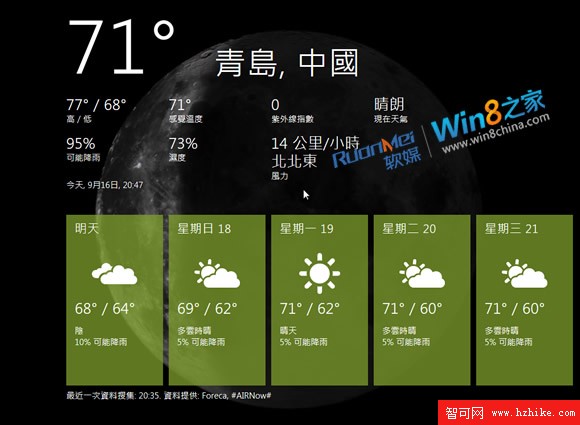
誤以為「火焰山」溫度?其實是華氏度
友人體驗 Win8 天氣應用,驚呼溫度異常偏高「趕上火焰山」。一看單位——原來是 華氏度 (°F),非我們慣用的攝氏度 (°C)。但他找遍介面也找不到切換選項,懷疑微軟「針對中國用戶」。
步驟 1:新增城市 (支援拼音)
- 開啟 Metro 介面「Weather」磁貼。
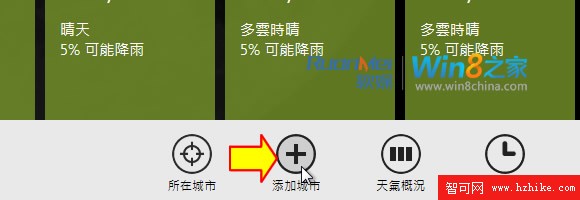
- 右鍵點擊 (觸控長按) → 底部面板選「Add a city」/「添加城市」。
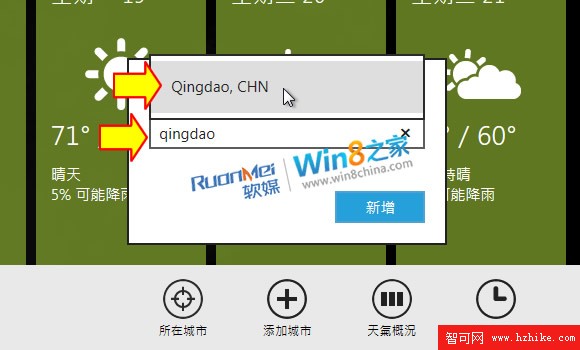
- 輸入城市拼音 (如 qingdao) → 選擇「Qingdao, CHN」。
步驟 2:關鍵神鍵 Win + I 切換單位
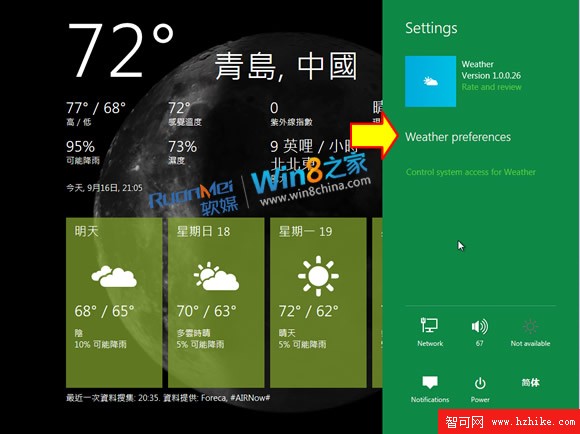
- 在天氣應用介面按 Win + I (或滑鼠移至左下角選 Settings)。
- 右側綠色設定欄出現「Weather preferences」/「天氣偏好設定」。
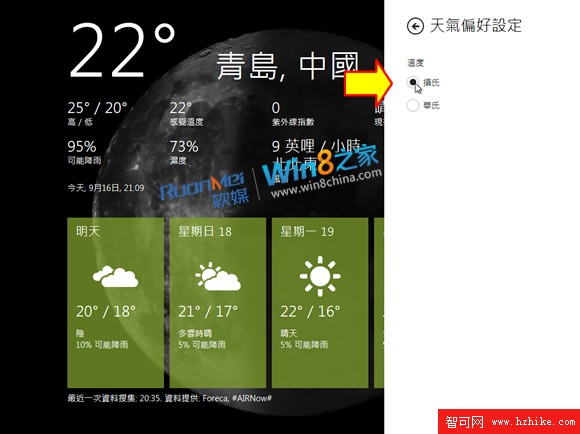
- 點入後選擇 Celsius (攝氏) / Fahrenheit (華氏),即時生效。
Metro 設計隱憂:扁平化過度導致可點擊性不明
「Weather preferences」純文字無按鈕樣式,極易被忽略。Metro 簡潔美觀卻犧牲了可發現性,這點亟待改進。