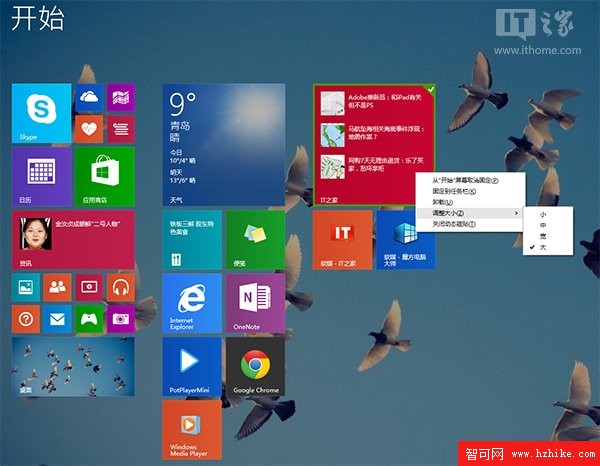
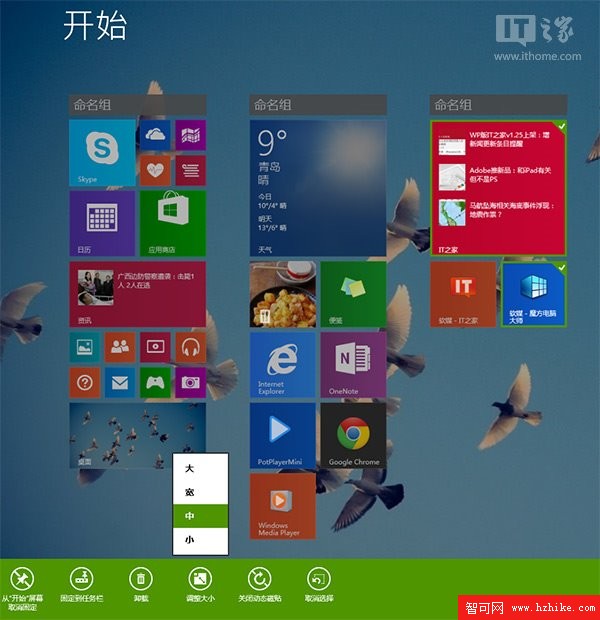
Windows 8.1 Update 為開始畫面磚塊新增右鍵選單管理功能,方便傳統滑鼠鍵盤操作,但捨棄了原本的 Modern 風格工具列(App Bar)。若習慣原生觸控介面,只需一個按鍵即可切換回來。
在 Windows 8.1 Update 的開始畫面,直接按下 空白鍵,即可喚出 Modern 工具列,支援群組命名、多選管理等原生觸控操作。
這項隱藏技巧讓使用者能在新舊介面間靈活切換,兼顧滑鼠與觸控兩種操作習慣。
Win 8 Win+X 快捷鍵彌補消失的「開始」按鈕
Windows 8 系統垃圾清理三大法:360/金山、Win8 優化大師、自製批次工具
Win8 索引建立與搜尋常見問題:加入位置、暫停索引、重建與權限設定
Windows 8 螢幕解析度與方向設定:橫向/縱向切換、重新整理率、顯示卡屬性
Win8.1 安裝字型完整圖文教學:.ttf/.fon 檔案複製到 Fonts 資料夾即可
Windows 8 內建中文輸入法完整設定(一):新增微軟拼音與切換技巧
Windows 8.1 Update 技巧:在現代應用中快速喚出傳統工作列
Windows 8 透過增加虛擬記憶體緩解系統卡頓:進階系統設定圖文教學