升級 Win 8.1 後睡眠無法喚醒或無法進入睡眠?兩招嘗試修復:
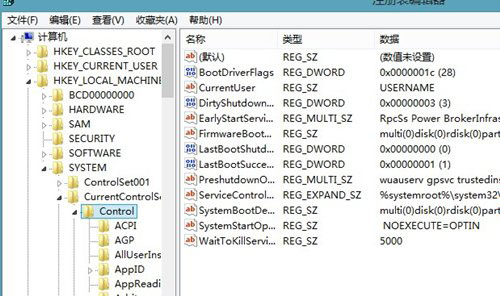
HKEY_LOCAL_MACHINE\SYSTEM\CurrentControlSet\Control\Session Manager\Power
AwayModeEnabled
睡眠非關機,旨在快速恢復工作狀態。睡醒失敗等同關機,較真的用戶可嘗試上述修復,找回便利的睡眠功能!
Win8.1 Update WIMBoot 技術深度解析:壓縮映像啟動、分區新架構、DISM 部署
Win8 如何找回經典開始選單?群組原則啟用「強制經典開始選單」
微軟高管暗示 Windows 8 將於 2012 年秋季正式發布
Win 8.1 新增無線印表機報錯 0x0000057?兩招輕鬆搞定
Win8 攝影機權限設定:開啟「相機與麥克風」存取權,解決無法啟動相機 App
Windows 8:重塑 Windows——BUILD 2011 歷史時刻回顧
Windows RT 8.1 續航力不足?官方 powercfg 指令修復教學
Windows 8 手動設定靜態 IP 位址圖文教學