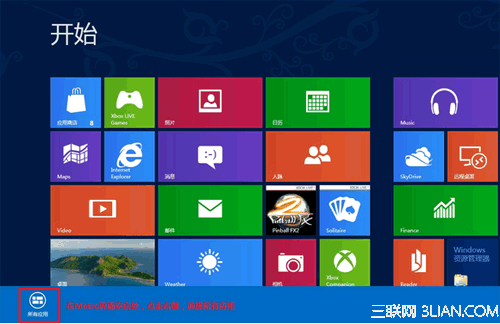
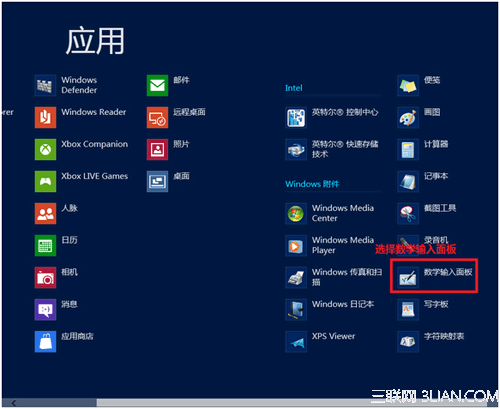
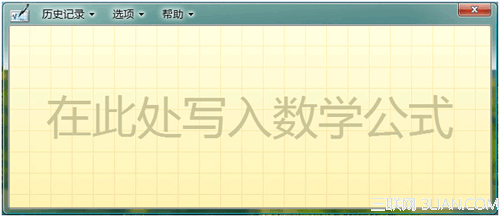
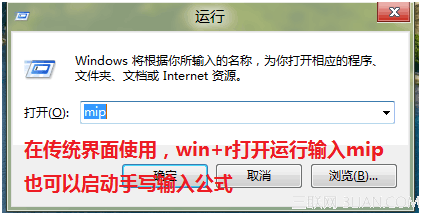
Windows 8 內建「數學輸入面板」,支援手寫數學公式並轉換為 MathML/LaTeX 格式插入文件。
mip
手寫完成後可點選「插入」將公式送至作用中應用程式(Word、OneNote 等),支援觸控螢幕與滑鼠手寫。
Win8.1 英文字體發虛模糊不渲染問題完美解決方案
Windows 8.1 IE11 花屏解決方案:更新 Intel 核顯驅動程式
Win8 三種安裝方式利弊分析:覆蓋升級、雙系統、虛擬機
Win8.1 驅動程式安裝運行模式改進詳解
Windows 8 關閉執行中現代應用:Win+Tab 工作檢視右鍵關閉、滾輪中鍵快速關閉
Windows 8 PIN 碼登入建立完整教學
Win8.1 ISO 下載與安裝媒體製作全攻略,官方工具一鍵搞定
Start8 讓 Windows 8.1 找回經典開始選單:中文破解版安裝與詳細設定教學