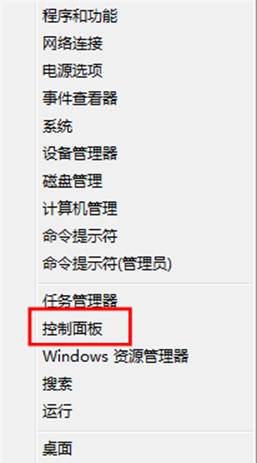
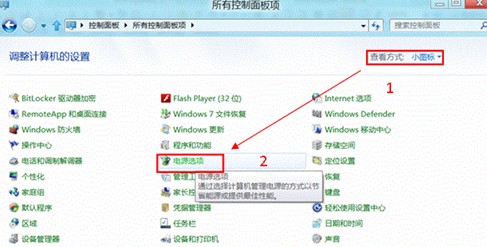
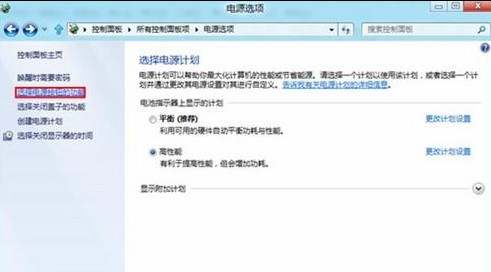
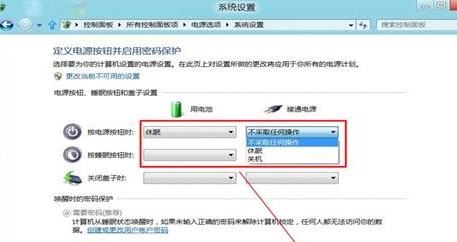
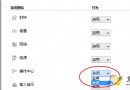
Windows 8 可自訂實體電源按鈕、合上筆電螢幕的動作:
筆電用戶建議「合上蓋子」設為「睡眠」,「電源按鈕」設為「休眠」或「關機」,兼顧便利與資料安全。
連線微軟內部揭秘:Windows 8 新核心直接支援 ARM、開機速度大幅提升
Win8 查看系統版本資訊:圖形介面與指令列雙管齊下
Windows 8 啟用密碼保護共用:保障網路資料安全
Win8 動態磚塊深度活用:即時資訊、尺寸差異、啟用技巧完整圖文教學
Win8 系統如何關閉 IE 瀏覽器關閉多個分頁的警告提示?
Windows 8 截圖自動儲存至桌面:登錄修改 ScreenshotIndex 改變預設路徑
Windows 8.1 快速切換使用者帳戶:Shift+右鍵「以其他使用者身分執行」與多帳戶管理
安裝 Windows 8 系統硬體需求完整表:基本規格與進階功能門檻