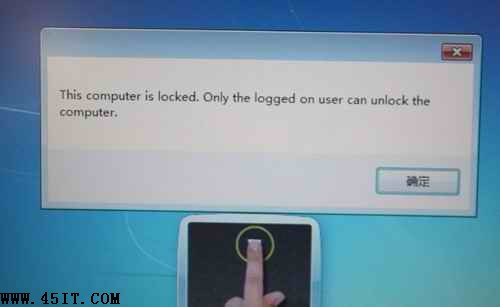
現象: Win+L 鎖定後,指紋登入提示「This computer is locked. only the logged on user can unlock the computer」,必須輸入密碼。
原因: 修改過使用者名稱/密碼,導致指紋資料與帳戶關聯失效。
注意: AuthenTec 指紋晶片通用此解法。清除硬體層級指紋資料後重新建立關聯,即可恢復鎖定後指紋解鎖功能。
Windows 7 影子複製技術:利用「以前的版本」快速還原誤刪檔案與資料夾
Win7 桌面圖示全變一樣?「還原預設圖示」一鍵修復
玩轉 Windows 7:Win7/Vista 快速鍵大全(二)——Win7 新增任務列/視窗管理與 Vista 基礎鍵
Windows 7 隱藏版炫酷氣泡螢幕保護程式:登錄啟用 MaterialGlass 效果
Windows 7 必須移除的五大惹人厭功能評論
Win7 讓資源管理器預設開啟「電腦」而非「程式庫」的技巧
Win7 啟用 Aero 特效三步驟:確認版本、開啟 Aero Peek、套用 Aero 主題
Win7 開機卡住 / 安全模式卡在 disk.sys 完美解決(DiskPart 轉 MBR)