網頁資訊零散,只想列印關鍵段落?IE 內建「列印選取範圍」功能,無需複製到 Word 編輯:
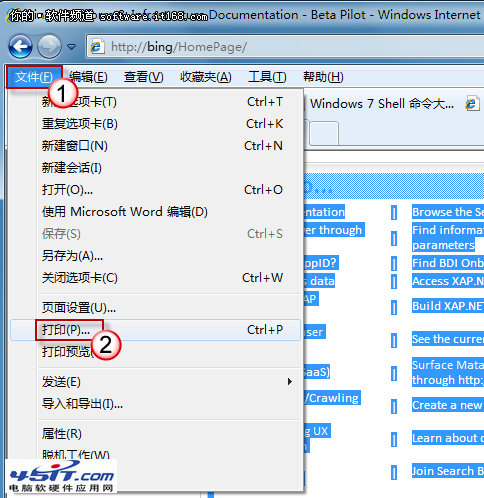
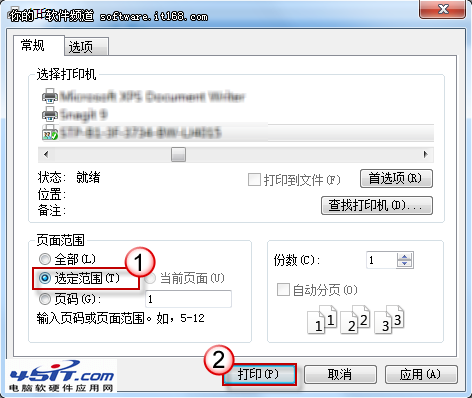
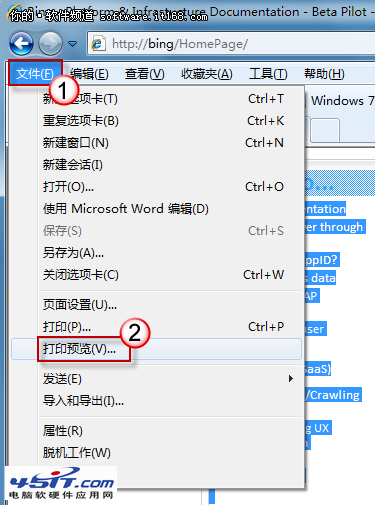
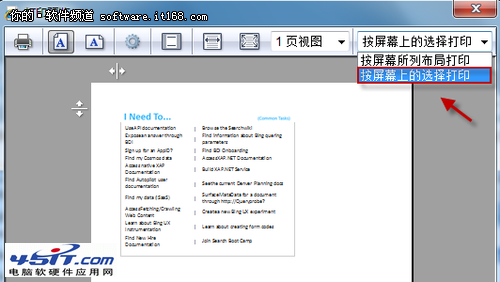
精準列印所需內容,節省紙張墨水,響應低碳環保。其他現代瀏覽器 (Chrome, Edge, Firefox) 同樣支援「列印選取範圍」。
不是病毒!深度解析 Windows 易混淆進程:Explorer.exe 與 Svchost.exe
Windows 7 与 Office 2010 激活密钥大全:MAK、OEM、Retail 多版本密钥集合
在 Windows 7 下安裝獨立 XP 雙系統:光碟安裝法與 Ghost 映像還原法完整教學
Windows 7 認證管理器與憑證管理器:密碼、憑證、備份一站式管理
Windows 7 玩 DOS 經典遊戲實戰:DOSBox 跑《仙劍奇俠傳》教學
放棄 XP,Win7 超越 XP 不止一點!深度對比與遷移建議
Windows 7 查看 Hyper-V 虛擬機器最大動態記憶體:效能監視器 + PowerShell 指令
Windows 7 資源管理器掛載 SkyDrive 25GB 雲端硬碟:SkyDrive Explorer 讓雲端如本地磁碟般操作