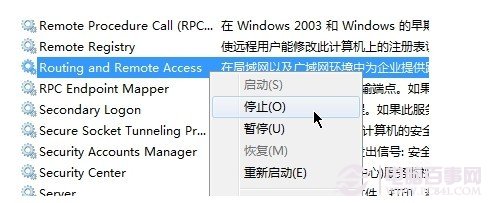
Win7 筆電無線網路明明能上網,右下角圖示卻顯示「未連線」(紅叉/黃驚嘆號),主因是「Routing and Remote Access」服務異常或總管進程狀態不同步。不重開機即可修復:
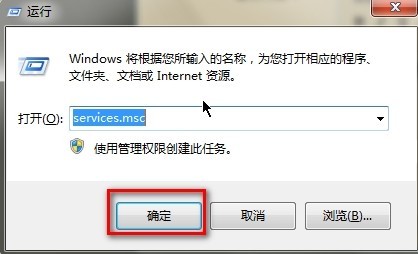
services.msc
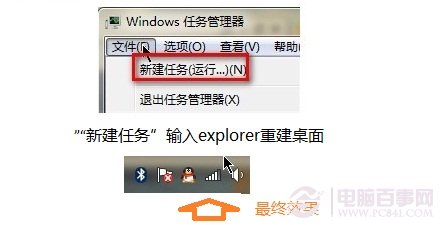
explorer.exe
explorer
此法解決服務與 UI 狀態不同步問題,省去重開機等待時間。
Windows 7 系統瘦身基礎篇:啟用 Administrator、關閉休眠、移除預載驅動與多語系檔案
深度解析 Windows 7 備份還原機制:卷影複製、文件備份與系統映像三大核心功能
清除Win7自動追蹤遊戲記錄:三步關閉「遊戲總管」收集功能
Windows 7 64位元系統網卡驅動安裝失敗?以系統管理員身分執行安裝程式即可解決
專業用戶必看:Windows 7 相容性問題完整解決方案(含 XP Mode 終極大招)
Windows 7 系統還原與映像備份完整實戰指南(二):還原點建立、設定與光碟還原
Win 7 自動更新佔滿 C 槽?清理 SoftwareDistribution 資料夾
善用 Windows 7 自修復功能:系統崩潰免重灌,啟動修復、系統還原、映像還原與修復光碟全攻略