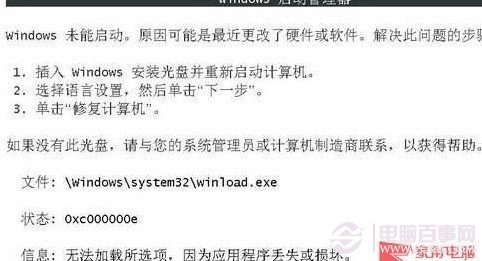
開機出錯、F8 無法進入進階選單,使用 WinPE (USB/光碟) 修復:
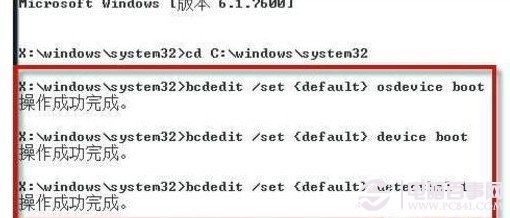
cd c:\windows\system32
bcdedit /set {default} osdevice boot
bcdedit /set {default} device boot
bcdedit /set {default} detecthal 1
此法修復 BCD 開機配置資料損毀,適用無法進入安全模式/最後一次正確設定之嚴重情況;重要資料建議先備份再操作。
Win7 自動更新佔滿 C 槽空間?清理 SoftwareDistribution 與調整更新策略
USB 無線網卡驅動安裝全攻略:以 TP-Link 為例圖文教學
Win7 0x0000003B 藍屏死機微軟官方修補程式
正確設定 Windows 7 虛擬記憶體:破除三大迷思
Windows 7 有趣發現:拖動視窗邊緣快速撞擊工作列觸發水波震盪特效
Win7 下 Gmail MHTML 漏洞利用代碼分析
正確去除 Windows 7 捷徑小箭頭:透明圖示 + 登錄表 Shell Icons 法,避免管理工具失效、無法鎖定工作列等副作用
Windows 7 工作列圖示不見了?教你找回隱藏圖示與系統圖示