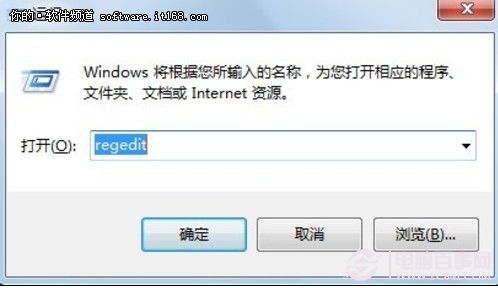
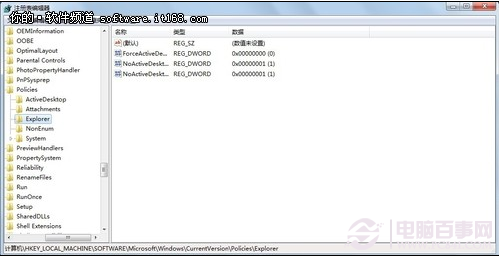
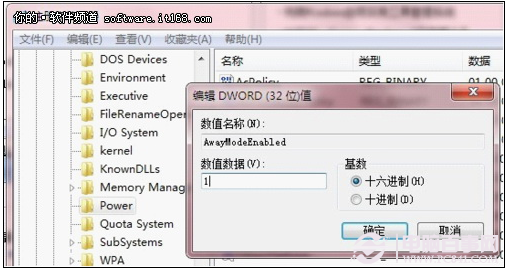
Win7 可透過登錄表啟用 Away Mode,讓電腦看似睡眠(關閉螢幕、靜音)實則繼續下載:
regedit
HKEY_LOCAL_MACHINE\SYSTEM\CurrentControlSet\Control\Session Manager\Power
AwayModeEnabled
1
省去購買「離線下載」功能費用,Win7 內建即可實現;需硬體與 BIOS 支援 Away Mode。
Windows 7 便箋進階用法:快捷鍵完整表與格式技巧
善用 Windows 7 程式庫功能與虛擬資料夾,輕鬆管理大容量硬碟資料
WinRAR 解壓縮太慢?修改臨時資料夾路徑避免雙重搬移
解決 Win7 筆電誤報「請考慮更換電池」:電池驅動重置完整流程
Win7 實現 3D 視窗切換(Win+Tab)失效原因與三種啟用方法
Win7 如何徹底移除印表機驅動程式?三步驟清除殘留
Win7 閒置自動黑畫面回到登入畫面?取消螢幕保護「恢復時顯示登入畫面」即解
系統崩潰不重灌!Windows 7 自修復四層防線:啟動修復 → 系統還原 → 映像還原 → 修復光盤