Windows XP Windows 7 Windows 2003 Windows Vista Windows 綜合教學 Linux 系統教學
Windows 10 Windows 8 Windows 2008 Windows NT Windows Server 電腦軟體教學

IE 收藏夾無法新增網頁?登錄表修復 Favorites 路徑秒解決

編輯:Win7 系統基礎知識

重灌系統後發現 IE 點「加入最愛」沒反應、收藏夾沒反應?多半是使用者設定檔路徑在登錄表裡指錯了。一條指令修正路徑即可恢復正常。

修復步驟

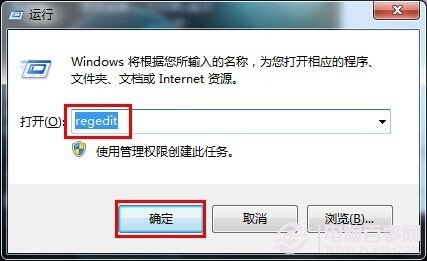
  1. 按 Win+R 輸入 regedit 開啟登錄表編輯器。
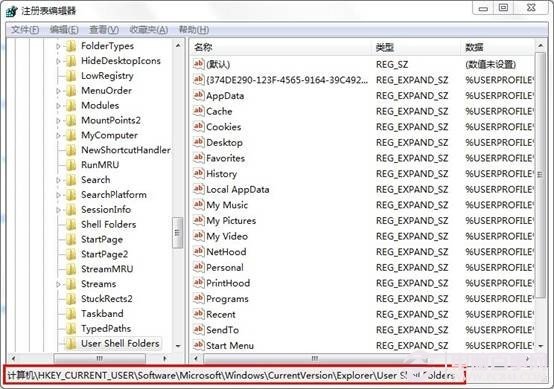
  2. 依序展開:
    HKEY_CURRENT_USER\Software\Microsoft\Windows\CurrentVersion\Explorer\User Shell Folders
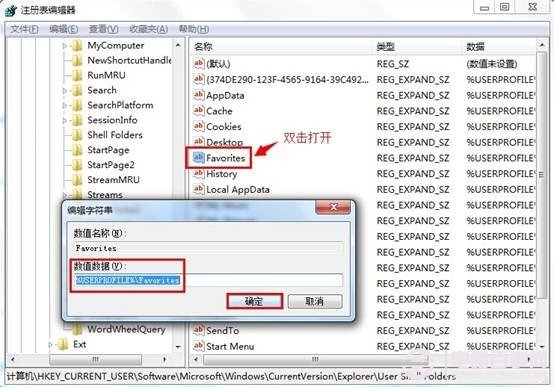
  3. 在右側找到 Favorites 字串值,雙擊修改數值資料為:
    %USERPROFILE%\Favorites
  4. 按確定、關閉登錄表、重開 IE 即可正常收藏。

開啟 regedit
定位 User Shell Folders
修改 Favorites 路徑

原理說明

重灌或遷移設定檔時,User Shell Folders 記錄的收藏夾路徑可能指向不存在的舊路徑(如舊磁碟代號、舊使用者名稱)。修正為環境變數 %USERPROFILE%\Favorites 讓系統自動解析正確位置。

補充

  • 同樣問題也可能出現在「桌面」、「我的文件」等 Shell 資料夾,修法相同。
  • 修改登錄表前建議匯出備份該分支,以防誤改。

一分鐘搞定,收藏夾功能全恢復!

Copyright © Windows教程網 All Rights Reserved