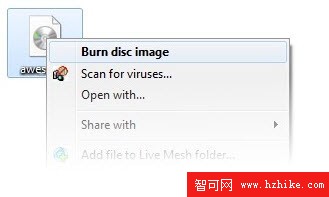
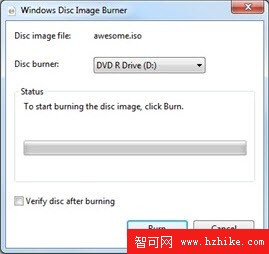
Windows 7 終內建 ISO 燒錄功能,無需 Nero、ImgBurn 等第三方工具:
.iso
支援格式僅限 ISO(不支援 IMG、MDF、BIN 等),功能極精簡但覆蓋 90% 用戶需求。介面清爽、無廣告、系統整合度高,展現微軟補齊長期缺失基本功能的決心。
Windows 7 執行命令大全:200+ 快速啟動系統工具的鍵盤捷徑
Windows 8 消費者預覽版五大不完美體驗點評 (下):Metro 遊戲無法正常關閉、聊天工具無訊息提醒
Windows 7 隱藏強化版「傳送到」選單:Shift+右鍵,直達個人資料夾深處
Win7 防火牆無法啟用、推薦設定無反應?登錄權限修復法
Win7 修改暫存檔路徑,釋放系統碟空間
Win7 內建 ISO 燒錄功能:右鍵 ISO 檔選「燒錄光碟映像檔」無需第三方軟體
Windows 7 遠端媒體串流:出差也能播放家裡電腦的影音檔案
Windows 7 試用手記:從 RTM 洩露到正式版的體驗與觀察