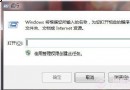
想知道 Windows 7 系統從安裝到現在運行了多久?只需簡單指令即可查詢:
cmd
systeminfo
結果中「原始安裝日期」即為系統初次安裝時間(亦稱系統「生日」)。若曾使用 Ghost 還原系統,顯示的仍為原始安裝日期而非還原時間。
同一畫面還可查看:電腦名稱、處理器型號、網路卡資訊、已安裝修補程式數量等詳細系統資料,是系統維護與資產管理的好幫手。
千萬別讓 Windows 7 自動建立 200MB 隱藏分區!刪除會損壞分區表,附避免方法
Windows 7 開機與關機加速四大絕招:停用啟動項、縮短關機等待、關閉 Aero 特效、啟用全核心啟動
Win 7 優化軟體慎用:清理垃圾導致 Jump List 遺失、去箭頭致任務列無法鎖定、精簡服務引發藍畫面
IE9 + Windows 7 任務列網站釘選:拖曳網址到任務列,一鍵直達、跳躍清單、縮圖播放控制,瀏覽器變應用
Windows 7 遊戲總管特色解析(三):家長控制與遊戲分級
Win7 如何阻止自動安裝驅動程式?裝置安裝設定三步驟關閉
流氓軟體強制修改 IE 首頁?群組原則鎖定首頁永不被篡改
超強分區表重建工具:易我分區表醫生拯救誤刪分區導致無法開機的硬碟