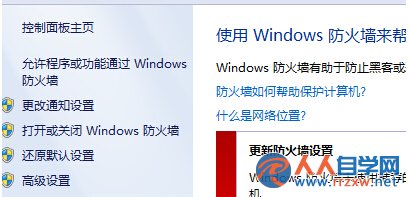
區域網路共用印表機時出現錯誤代碼 0x00000001,多因 Windows 防火牆設定阻擋列印服務。還原防火牆預設設定即可快速解決。
0x00000001
此法適用於 Win7 所有版本,操作簡單無風險。
Win7 關閉 360 安全衛士 Ctrl 快捷搜尋功能:三步移除工具欄圖示
Win7 硬碟圖示不見了?清除圖示快取與刪除 autorun.inf 雙重修復法
Win7 靈活調控麥克風音量與增益 讓網路語音暢聊無阻
Win7 無法識別 USB 導致啟動盤製作失敗?兩大主因與完整解決方案
Windows 7 內建虛擬機:用 Windows Virtual PC 在 Win7 跑 Win7
Win7 無法更改螢幕保護程式?群組原則「阻止更改螢幕保護程式」設為未配置即解決
Windows 7 隱藏登入畫面 Administrator 帳號:登錄編輯法
Win7 使用 USB 隨身碟必知三大注意事項:正確拔除、減少刷新、避免長時間空轉