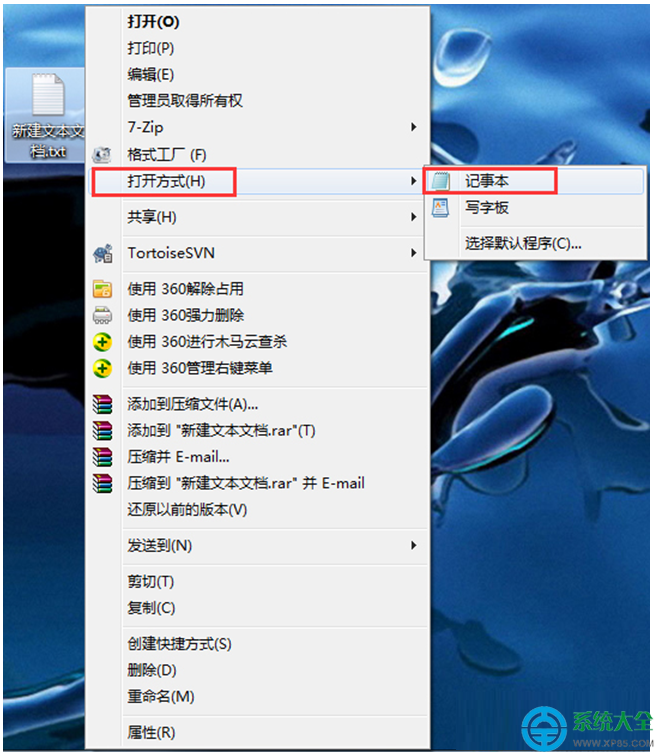
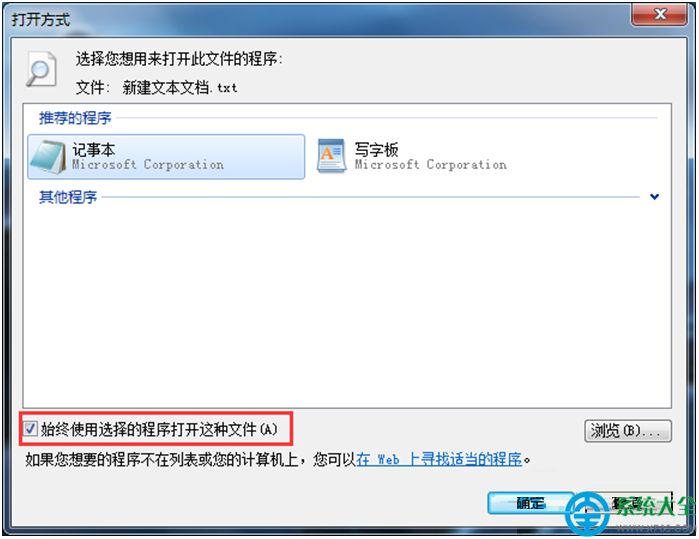
部分精簡版 Windows 7 系統預設未關聯 .txt 檔案至記事本,導致雙擊無法開啟。可透過「開啟方式」手動指定記事本為預設程式,若記事本本身損毀則需替換系統檔或重灌系統。
C:\Windows\System32\notepad.exe
若上述方法無效,可能是 notepad.exe 系統檔損毀,建議從其他正常電腦複製同版本的 notepad.exe 覆蓋,或重新安裝 Windows 7 系統。
notepad.exe
Win7玩《無人深空》「停止工作」崩潰完整排查指南
4000 元預算買遊戲筆記本?別被坑,看這份避坑指南
加速 Windows 7 開關機:修改開機等待秒數、縮短關機服務超時時間
為 Win7 換上 Win8 外觀:Windows 8 Skin Pack 1.1 主題包安裝體驗
Win7 檔案開啟方式錯誤?顯示副檔名 + 重新關聯正確程式
Win7 桌面小工具消失?註冊 DLL 與重設 IE 安全性快速修復
Win7 筆電單邊喇叭無聲音的聲道平衡調整法
Win7 一鍵靜音/取消靜音快捷鍵設定教學 (含定時自動靜音)