Win7 Windows Update 報錯 80070003 (系統找不到指定路徑),主因更新快取資料夾 SoftwareDistribution 損毀。停用服務 → 刪除 Download 與 DataStore 內容 → 重啟服務,重設更新元件徹底修復。
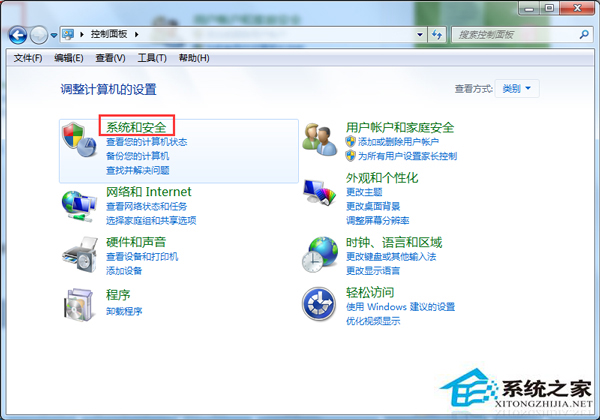
控制台 → 系統與安全性 → 系統管理工具 → 服務 → 找 Windows Update → 右鍵「停止」。
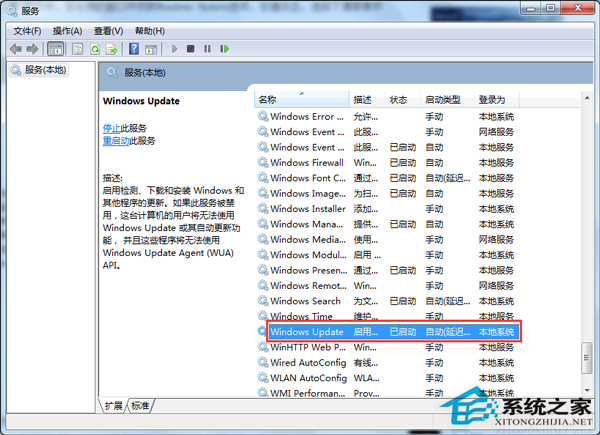
C:\Windows\SoftwareDistribution\Download → 全選刪除 (需管理員權限)。C:\Windows\SoftwareDistribution\DataStore → 全選刪除。服務管理員 → 右鍵 Windows Update → 「啟動」 → 重新檢查更新應正常下載安裝。
替代指令法 (管理員 cmd):更快速且可製作批次檔自動化。net stop wuauserv del /f /s /q %windir%\SoftwareDistribution\Download\* del /f /s /q %windir%\SoftwareDistribution\DataStore\* net start wuauserv