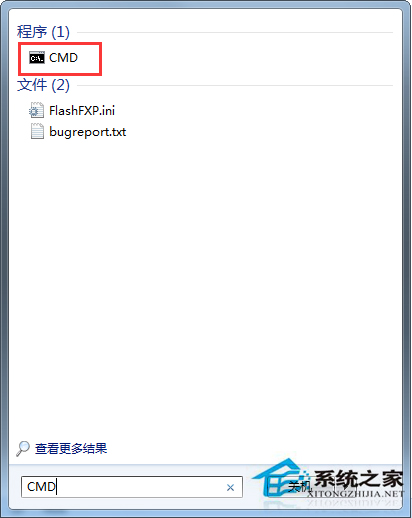
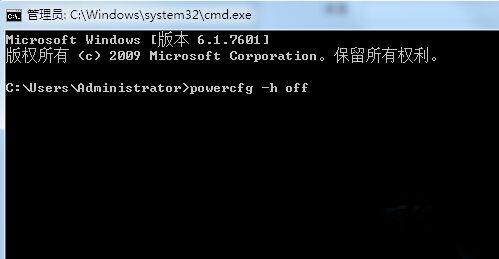
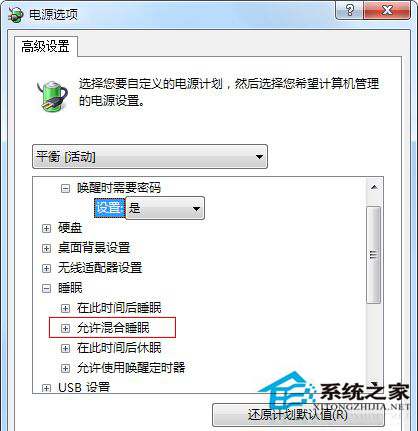
電源選項缺少「允許混合睡眠」子選項?主因是休眠功能被關閉。執行 powercfg -h off 再 powercfg -h on 重置休眠即可恢復混合睡眠選項。
powercfg -h off
powercfg -h on
cmd
原理說明:混合睡眠 = 睡眠(記憶體供電)+ 休眠(寫入 hiberfil.sys)。系統檢測到休眠不可用時會隱藏混合睡眠選項。重置休眠狀態即可觸發選項顯示邏輯。
Win7 開機錯誤 0xC000000F:用安裝光碟重建 BCD 引導修復
Win7 網路共享設定與安全管理:指令查看、刪除共享全攻略
第三方軟體成 Windows 7 最大安全威脅:核心雖強、元件與人成駭客突破口
Win7 透過 CMOS (BIOS) 啟用進階電源管理 (APM)
Win7 網頁驗證碼(CAPTCHA)不顯示?IE 安全性/隱私/進階三頁籤設定修復
Win7 工作管理員標題列與選單列消失?雙擊邊框即可恢復
Win7 360 殺毒/安全衛士誤殺隔離檔案如何恢復?
卸載 Windows 7 後如何移除多重開機選單?XP/Vista 環境下的修復開機磁區指令