Windows XP Windows 7 Windows 2003 Windows Vista Windows 綜合教學 Linux 系統教學
Windows 10 Windows 8 Windows 2008 Windows NT Windows Server 電腦軟體教學

Win7 無法啟動 Windows 安全中心服務完整修復教學

編輯:Win7 系統應用技巧

Win7 系統動作中心彈出「無法啟動 Windows 安全中心服務」警告,通常是因為 Security Center 服務未啟動,或其相依服務 Remote Procedure Call (RPC) 與 Windows Management Instrumentation (WMI) 異常。以下提供透過服務管理單元逐步修復的標準流程。

修復步驟

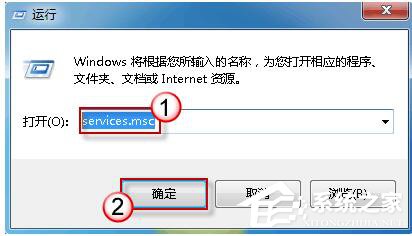
  1. 按 Win+R 輸入 services.msc 開啟服務管理單元。
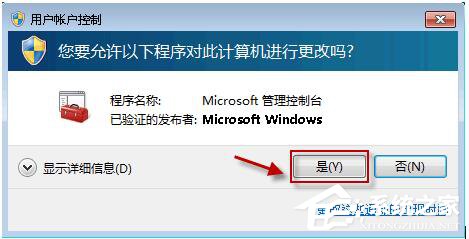
  2. 若彈出使用者帳戶控制 (UAC) 提示,點選「是」允許繼續。
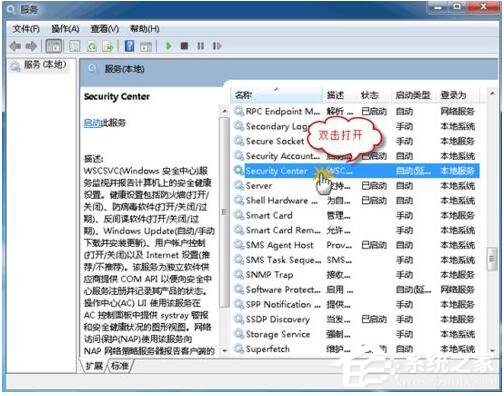
  3. 在服務清單中找到 Security Center,雙擊開啟內容頁面。
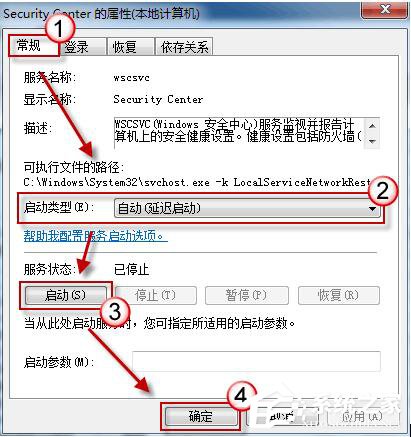
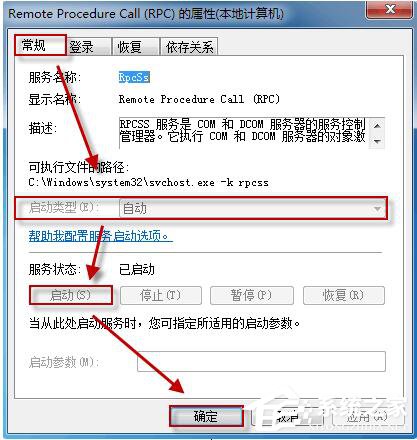
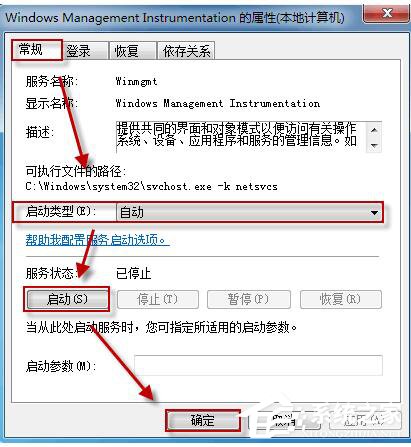
  4. 在「一般」索引標籤:
     ① 啟動類型改為 自動
     ② 點擊「啟動」按鈕啟動服務
     ③ 點擊「確定」儲存
  5. 若 Security Center 仍無法啟動,請依同樣步驟確認並啟動以下兩項相依服務:
     • Remote Procedure Call (RPC)
     • Windows Management Instrumentation
  6. 相依服務啟動後,再次嘗試啟動 Security Center 服務,確認是否成功。

此方法可解決 Win7 安全中心服務無法啟動、動作中心持續報警、防火牆/防毒軟體狀態異常等問題。若服務仍無法啟動,建議執行 sfc /scannow 修復系統檔案,或檢查是否有第三方安全軟體衝突。


Copyright © Windows教程網 All Rights Reserved