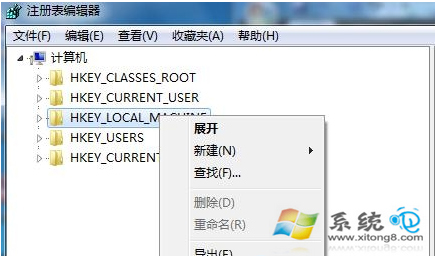
為追蹤登錄被修改紀錄,可啟用登錄稽核,記錄特定使用者或群組對登錄的存取與修改動作。
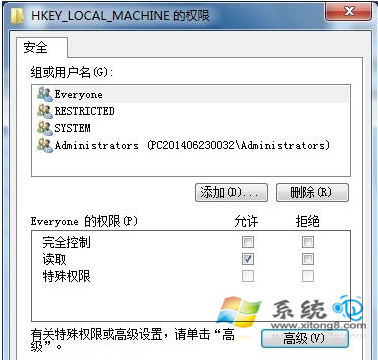
1. 按 Win+R 輸入 regedit,右鍵點選 HKEY_LOCAL_MACHINE 選「權限」。
regedit
HKEY_LOCAL_MACHINE
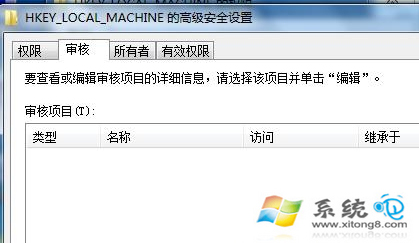
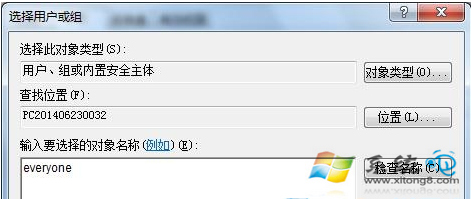
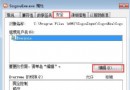
2. 點「進階」→「稽核」頁籤→「新增」→輸入 Everyone(或特定使用者)→確定。
Everyone
3. 設定稽核成功/失敗事件,重新開機後即可在事件檢視器「安全性」記錄中查看登錄修改紀錄。
啟用稽核後可追蹤誰修改了登錄,利於問題排查。
雙硬碟三系統 (Win7 + Ubuntu 12.04 + XP) GRUB2 手動配置詳解
Windows 7 SP1 相容性問題:IncrediMail、聯想系統更新等已知衝突清單
Win7 「區域連線沒有有效的 IP 設定」完整排除教學:十大原因與對策
Win7 桌面不自動重新整理?透過登錄檔新增 UpdateMode 強制啟用
Win7開機卡滾動條自動重啟?安全模式排查啟動項故障
Win7 旗艦版設定螢幕自動關閉時間:控制台 → 硬體和音效 → 電源選項 → 選擇關閉螢幕的時間
Windows 7 取消開機登入畫面直接進入桌面:控制使用者帳戶設定
Win7 無聲音?原廠驅動缺 HDMI 支援,用驅動精靈補全即可解決