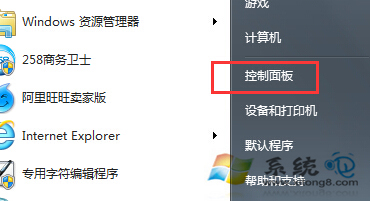
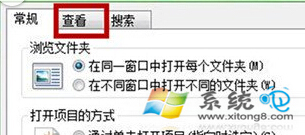
需要存取系統隱藏檔 (如 AppData、ProgramData)?資料夾選項勾選「顯示隱藏的檔案、資料夾和磁碟機」即可顯示。
隱藏檔會以半透明圖示顯示。操作完成後建議取消勾選恢復隱藏,避免誤刪系統關鍵檔案。若需查看受保護系統檔,同介面取消勾選「隱藏受保護的作業系統檔案」 (不建議常態開啟)。
Windows 7 禁止區域網路用戶存取共享檔案三大法
Windows 7 IE10 字型模糊解決方法
Win7通知區域藍牙圖標消失修復:啟用Bluetooth系統托盤顯示
電腦連得上 QQ 卻開不了網頁?手動設定 DNS 解決
微軟 CEO 鮑爾默:Win 7 前 10 天銷售破歷史紀錄 啟動速度快成關鍵推手
調整 Windows 7 系統還原磁碟空間佔用:三步驟自訂配額或徹底停用
Win7 工作列時間顯示設定:長/短日期格式、任務列寬度調整、秒數顯示
Win7 祕密功能雙雄:顯示色彩校正 DCCW、問題步驟記錄器 psr.exe 遠端協助神器