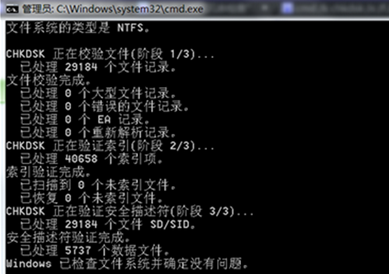
複製檔案時跳出「循環備援檢查」(CRC) 錯誤,通常代表磁碟有壞軌或檔案系統損毀。用 chkdsk 參數修復,多數情況可挽救資料。
chkdsk
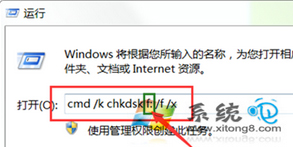
cmd /k chkdsk f: /f /x
f:
/f
/x
/r
重要提醒:若磁碟有物理損壞(異響、頻繁掉盤),請優先備份重要資料再嘗試修復,或尋求專業資料救援。
Win7 計算機不只是加減乘除:科學/程式設計/統計/單位換算/試算表全能神器
Windows 7 開機 F8 選單缺少「修復電腦」選項?手動新增修復環境項目
微軟 IE 外掛 Diff-IE 體驗:網頁變化高亮對比,刷版神器
Windows 7 修復任務列位置變動問題與新增關閉按鈕改進
Win7 放大鏡使用教學:Win+加號啟動、全螢幕/鏡頭/停駐模式切換、快捷鍵完整表 (縮放/反色/追蹤焦點)
Windows 7 固態硬碟 (SSD) 深度優化指南:TRIM、SuperFetch、分頁檔與壽命管理
Windows 7 IE8 啟用游標瀏覽模式:鍵盤精準選取網頁文字
Windows 7 全新安裝後必跑 Windows Update 的六大關鍵修補說明