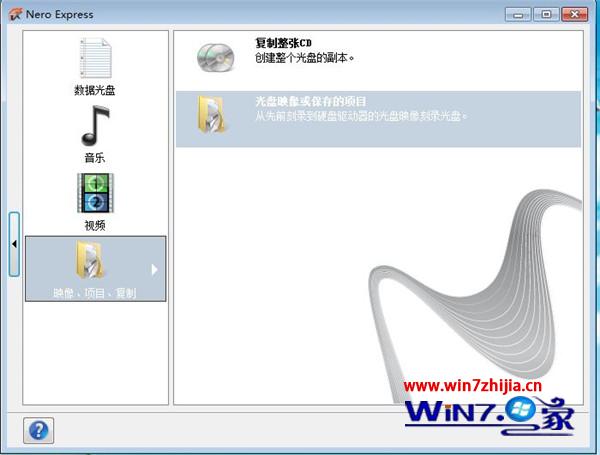
安裝 Nero 後,放入空白 DVD,啟動 Nero Express 介面。
點擊「映像、專案、複製」→「光碟映像或已儲存的專案」,瀏覽並選取 ISO 檔案。
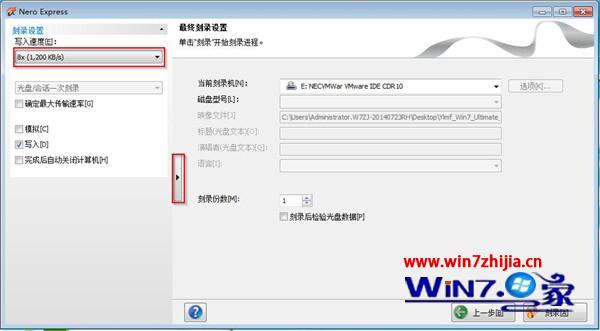
建議將寫入速度降低以提高穩定性:CD 建議 24x 以下,DVD 建議 8x。其他選項保持預設。
點擊「刻錄」按鈕,勾選「驗證寫入資料」。刻錄完成後光碟機會自動彈出,即完成開機光碟製作。
使用 Nero 刻錄 ISO 映像檔是製作 Windows 7 安裝光碟最可靠的方法之一,遵循上述步驟可大幅降低燒錄失敗風險。
Win7 不顯示最小化視窗怎麼辦?重啟 Explorer 與刪除登錄機碼雙重修復
Win7 不斷彈出「處理器快取層級結構錯誤」解決方案
Win7 桌面捷徑小箭頭怎麼去掉?透明圖示替換法最完美
Win7 任務管理器極速啟動:Ctrl+Shift+Esc 一鍵直達
Win7 進入安全模式兩大標準方法:F8 鍵與 Ctrl 鍵啟動選單
Win7 旗艦版安裝軟體報錯 1327「無效磁碟機 G:」 (重複文章,內容同 78828)
U啟動 U盤裝 Win7 系統教程:一鍵製作啟動盤與安裝完整流程
Win7 註冊表一鍵完全禁用 USB 儲存裝置:修改 USBSTOR Start 值為 4