筆電合上蓋待機後網路自動斷線?新增登錄值 AwayModeEnabled 即可保持連線。
AwayModeEnabled
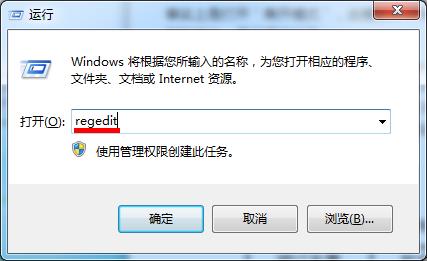
regedit
HKEY_LOCAL_MACHINE\SYSTEM\CurrentControlSet\Control\Session Manager\Power
1
之後待機狀態下網路將保持連線,適合下載、遠端存取等需求。
Win 7 開啟網頁顯示亂碼怎麼辦?
Win7 關閉視窗透明玻璃 (Aero Glass) 效果:效能選項自訂視覺效果一鍵關閉
Win7 輸入法圖示不見了?教你啟用語言列停靠任務欄
Windows 7 掛載 Virtual PC VHD 映像:主機與虛擬機檔案互通零障礙
Win7 工作列縮圖預覽停留時間太短?修改登錄檔 ExtendedUIHoverTime 延長文字提示顯示
Win7 找不到 DVD 光碟機(代碼 52)兩種修復方案:刪除登錄濾波器或關閉驅動程式簽章強制
Win7 插 USB 後卡頓 CPU 100%?services.exe 偽裝木馬專殺:結束程序、刪檔案、清登錄、重開機
Windows 8 防火牆進階設定完全指南:內建防火牆其實比第三方更強