Windows Update 報錯 80070020 (檔案被鎖定/衝突),提供兩種解決方案。
重新開機釋放檔案鎖定,再次執行 Windows Update 多數可成功。
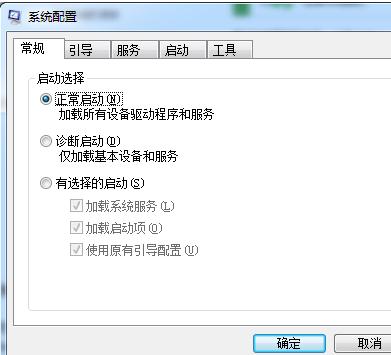
msconfig
安全模式下第三方服務/驅動不載入,可避免檔案鎖定衝突。
Win 7 禁用 DirectDraw 解決螢幕截圖黑屏問題:註冊表與驅動雙管齊下
無線路由器經典故障案例與排除實戰:登入失敗、連線錯誤、訊號干擾全解析
Win7 調整 CF 煙霧頭:16 位色深配合遊戲設定
Windows 7 僅是 Vista SP2?專家質疑升級價值
Win7 任務列日期顯示星期:控制台→日期時間→變更行事曆設定→短日期 yyyy-M-d dddd、長日期 yyyy'年'M'月'd'日' dddd
善用 BitLocker To Go 為隨身碟加密:Win 7 內建、免安裝、跨平台可讀
Win7 C 槽批量刪除 *.log 日誌檔:搜尋 + 全選 + 刪除三步走
數據揭曉:Windows 7 十月市佔率超越 Linux 與雪豹總和