針對 Win7 環境,提供更精簡的 QQ 熱鍵修改圖文流程:

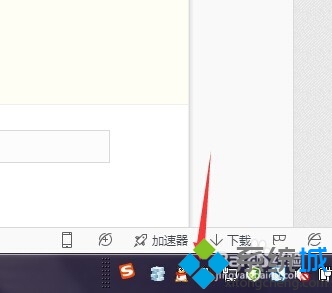
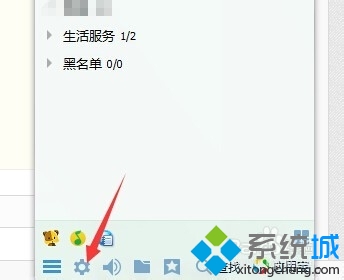
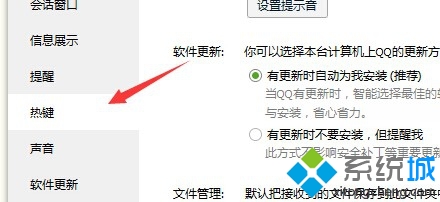
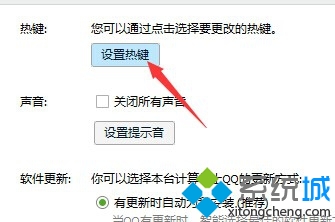
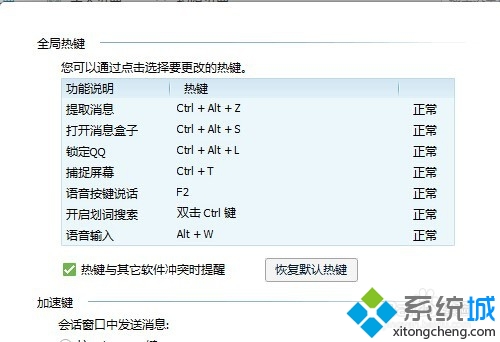
全程約 1 分鐘即可完成,解決熱鍵衝突困擾。
Win7 桌面捷徑全變 .lnk 副檔名?修復檔案關聯登錄值完整步驟
Win7 開機「Intel RST 服務未在執行」完整修復:BIOS 設定、服務啟動、相依服務檢查
Win7 執行操作後桌面右鍵重新整理反應慢?同 78965/78988 註冊表清理 ContextMenuHandlers 徹底加速
Windows 7 隱藏功能大公開:50 個實用技巧讓你用得更順手
Win 7 徹底關閉休眠:電源選項設「從不」不夠,必須 powercfg -h off 刪除 hiberfil.sys
從 Vista 直接升級 Windows 7 M3 實測:內建應用資料無法遷移、Windows.old 保留舊系統