IE8 引入第三方「網頁加速器」,但多為噱頭,甚至拖慢開頁速度。在真正提速前,建議透過群組原則徹底禁用。
gpedit.msc → 開啟「群組原則編輯器」。電腦設定 → 系統管理範本 → Windows 元件 → Internet Explorer → 加速器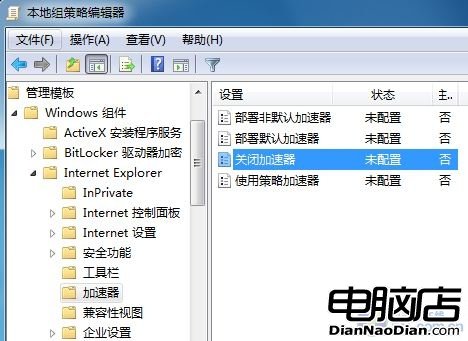
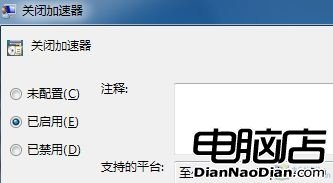
一鍵群組原則,徹底淨化 IE8 介面,避免加速器干擾與潛在相容性問題,適合企業部署與潔癖用戶。
Win7 附件裡找不到寫字板/計算機/記事本?命令啟動+複製開始選單捷徑雙修復
Win7 清除不需要的網頁/系統憑證:IE 憑證管理員、MMC 憑嚮管理單元雙管齊下
微軟證實 10 月 28 日發布 Windows 7 預覽版:PDC 大會釋出 Beta 1 前版本、M3 穩定性大增、傳聞 2009 年 6 月 3 日上市
Windows 7 任務列圖示功能完整解析:合併/不合併、縮圖預覽、跳躍清單與進度條顯示
Win7 調整監視器色彩品質至真彩色 (32 位元) 解決畫面模糊
基於 Vista 升級而來:Windows 7 UAC (使用者帳戶控制) 深度解析與四級防護詳解