IE10 預覽版安裝後取代 IE9,若遇相容性問題需移除。透過控制台面板「程式和功能」→「檢視已安裝的更新」即可解除安裝,系統自動回滾 IE9。
移除步驟
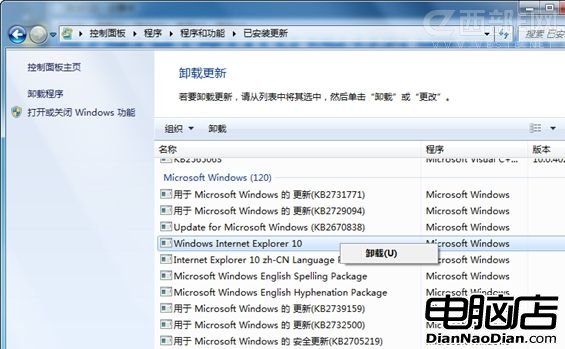
- 開啟「控制台面板」→「程式」→「程式和功能」。
- 左側點選「檢視已安裝的更新」。
- 列表中找到 「Internet Explorer 10」 (屬於 Microsoft Windows 類別)。
- 右鍵 → 「解除安裝」→ 確認對話框選「是」。
- 完成後選擇:「立即重新啟動」或「稍後重新啟動」。
注意事項
- 同樣適用於移除 IE11、IE9 等版本。
- 移除後若系統更新又推送 IE10,可在「Windows Update」→「已安裝的更新」中右鍵隱藏該更新。
- 企業環境建議用群組原則「關閉 Internet Explorer 自動更新」或 DISM 離線移除套件。