Windows XP Windows 7 Windows 2003 Windows Vista Windows 綜合教學 Linux 系統教學
Windows 10 Windows 8 Windows 2008 Windows NT Windows Server 電腦軟體教學

Windows Virtual PC 深度體驗:不只是 XP Mode,更像客戶端版 Hyper-V

編輯:Windows 7 系統介紹

Windows 7 的 XP Mode 實際運行於全新虛擬化平台 Windows Virtual PC(非舊版 Virtual PC 2007)。微軟官方定義其為「Windows 7 選用元件,兼容舊版 Windows 應用」,但實測發現它更像 Hyper-V 的客戶端移植版:不僅能跑官方提供的 XP Mode,還支援自建虛擬機,操作邏輯類似 Virtual PC 2007 但運行於核心層,效能顯著更高。

系統需求

  • CPU:支援硬體虛擬化(Intel VT / AMD-V),1 GHz 以上 32/64 位元
  • 記憶體:最低 1.25 GB,建議 2 GB 以上;每部虛擬機建議 15 GB 磁碟空間
  • 主機 OS:Windows 7 全版本(Home Basic 至 Ultimate)
  • 客體 OS:官方支援 XP SP3、Vista SP1/Enterprise/Ultimate、Windows 7;實測其他 Windows 版本亦可安裝運行

注意:XP Mode 僅限 Professional、Enterprise、Ultimate 版本使用。
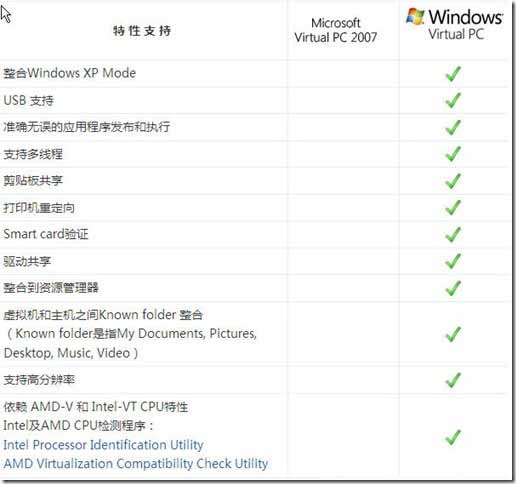
Windows Virtual PC 與 Virtual PC 2007 功能對比表見上圖。實際操作直覺易懂,建議自行安裝體驗。


Copyright © Windows教程網 All Rights Reserved