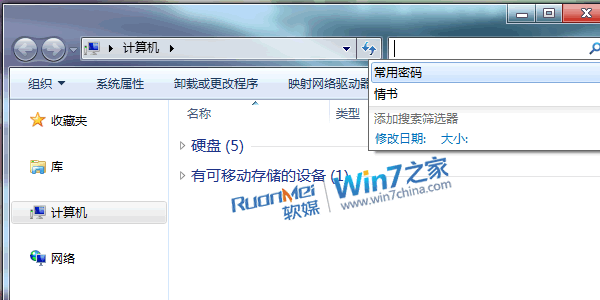
搜尋框下拉清單中,游標移至目標關鍵字,按 Delete 鍵即刪。
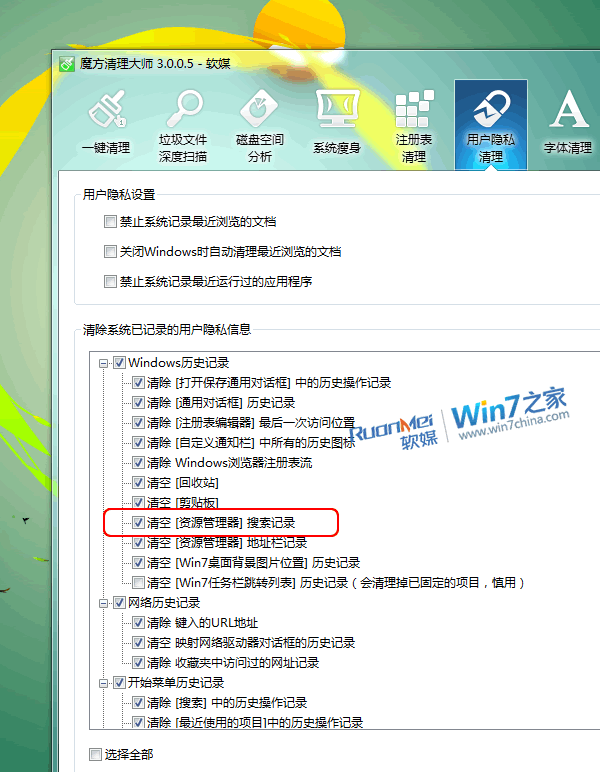
使用「魔方」→「清理大師」→「使用者隱私清理」→ 勾選「清空 檔案總管[搜尋記錄]」→ 一鍵清理。
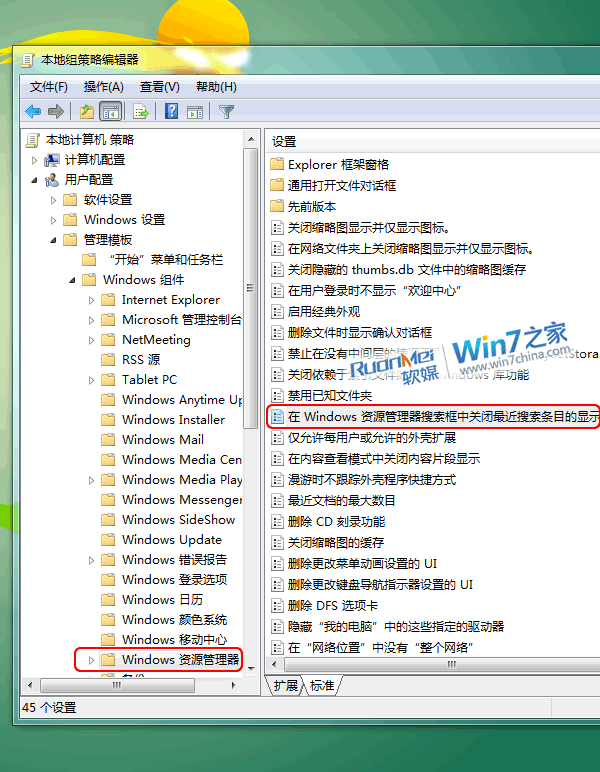
gpedit.msc
使用者設定 → 系統管理範本 → Windows 元件 → 檔案總管
設定即時生效,搜尋框不再保留任何歷史紀錄,隱私與整潔並重。
Win7 視窗最大化/最小化動畫效果消失?一鍵恢復動態縮放教學
Win7如何關閉搜狗/今日頭條彈窗廣告?電腦管家/360彈窗攔截一鍵淨化
Windows 7 Windows Vault 憑證備份還原:重灌系統免重輸帳號密碼
Windows 7 拒絕連接無線路由器?升級路由器韌體一招解決
Win7 64 位系統安裝軟體/變更設定後免重啟生效技巧
Win7 檔案總管搜尋功能失效?三大原因與對應解法
Windows 7 Beta 軟體相容性清單:安裝失敗、執行異常與解決方案彙總
在 Windows 7 中正確安裝 ThinkVantage APS 硬碟保護:必須先更新 Intel SATA 驅動程式