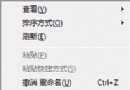
安裝 Office 2010 等 MSI 封裝軟體時出現「錯誤 1719:無法存取 Windows Installer 服務」,標準修復流程如下:
services.msc → 找到 Windows Installer → 雙擊 → 啟動類型 = 自動 → 啟動 服務。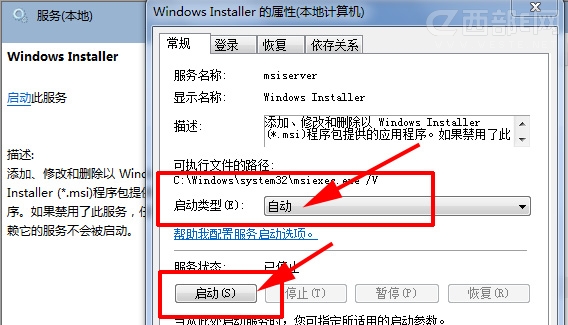
regsvr32 msi.dll按 Enter,提示 「DllRegisterServer 在 msi.dll 成功」 即表示修復完成。
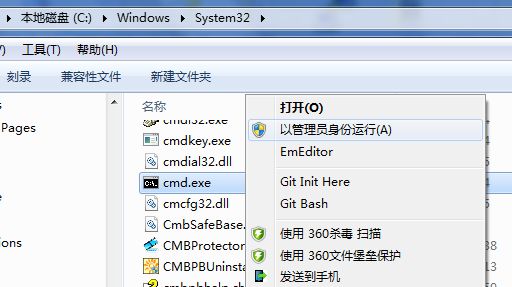
| 錯誤現象 | 原因 | 解決 |
|---|---|---|
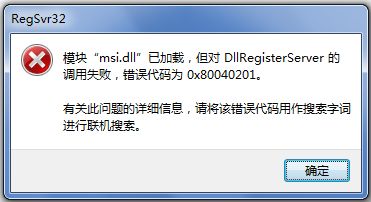
| regsvr32 提示 「模組 msi.dll 已載入,但 DllRegisterServer 呼叫失敗,錯誤碼 0x80040201」 | 未以系統管理員身分執行 CMD,權限不足 | 務必右鍵 CMD → 「以系統管理員身分執行」 |
| 服務啟動後自動停止 | 相依服務 (RPC、DCOM) 異常 | 檢查 RPC/DCOM 服務狀態,必要時執行 sfc /scannow |
| 重新註冊無效 | msi.dll 檔案損毀 | 從同版本 Win7 複製 msi.dll 覆蓋,或執行系統修復 |
同理適用於安裝其他 MSI 封裝軟體(Visual Studio、SQL Server、各類企業軟體)出現「錯誤 1719」的情況。
※ 本文內容與 ID 13848、13881、13891 重複,屬同一解決方案多次發布。