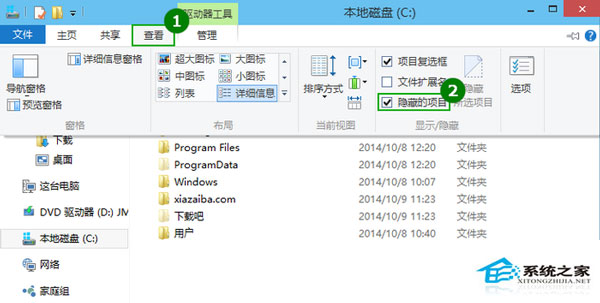
Windows 10 檔案總管顯示隱藏檔案極簡單,無需進入控制台資料夾選項。
取消勾選即隱藏。系統保護檔案仍隱藏,需在「資料夾選項」→「檢視」取消勾選「隱藏受保護的作業系統檔案」 (不建議)。
吐槽Win10亮度調節不如Win8.1靈活:25%固定檔位vs滑塊自由調節
Windows 10 寫字板設定依視窗大小自動換行
Win10 Surface Pro 4 連不上 WiFi?六大官方解決方案
Win10 刪除 windows.old 資料夾釋放空間:使用磁碟清理工具勾選「舊版 Windows 安裝」清理
Windows 10 照片應用刪除「精選集錦」圖片的方法
Win 10 遠端桌面連線兩種開啟方式:開始選單與 Win+R 指令
Win10 藍畫面 PAGE_FAULT_IN_NONPAGED_AREA?關閉快速啟動即可修復
暗黑破壞神 3 升級 Win10 後黑畫面/最小化無法切入?官方藍貼解決方案:更新顯卡驅動、開啟垂直同步、重裝遊戲