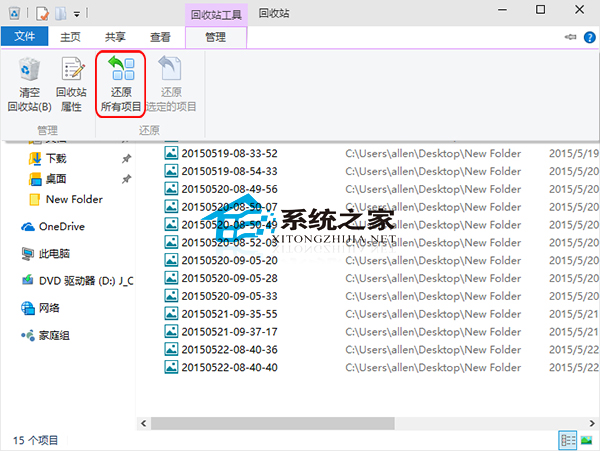
刪除的檔案預設堆積在資源回收筒。若為誤刪,想一次全部還原,該如何快速操作?以 Windows 10 為例說明。
此外,Windows 10 還可設定略過資源回收筒直接刪除檔案,適合追求操作便捷的使用者。
中國 Win10 用戶 2 天超越 Mac:StatCounter 數據詳解升級狂潮 (重複文章整合版)
Windows 10 安全軟體相容性實測:國產殺毒全過關、國外多數失效
Win10 累積更新 KB3116908 安裝失敗?刪除 SoftwareDistribution 特定資料夾重試
Win10 Edge 瀏覽器歷史記錄管理:單條刪除、按域名清理、一鍵清空
Win10 系統瘦身絕招:啟用 Compact OS 壓縮釋放 2GB 空間 (附 HDD 警示)
Win10 執行程式提示「發行者不受信任」怎麼解決?關閉 UAC 或 切換內建 Administrator 帳號
Win10 設定 Windows 照片檢視器為預設看圖工具:右鍵圖片→內容→開啟方式→更改→選擇 Windows 照片檢視器