Windows XP Windows 7 Windows 2003 Windows Vista Windows 綜合教學 Linux 系統教學
Windows 10 Windows 8 Windows 2008 Windows NT Windows Server 電腦軟體教學

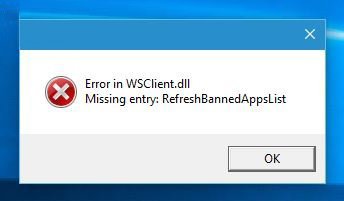
Windows 10 提示「Error in WSClient.dll」錯誤怎麼解決?排程器刪除 WSRefreshBannedAppsListTask 任務

編輯:Win10 系統應用技巧

升級新版 Insider Preview 後,開機/操作中反覆彈出 RunDll: Error in WSClient.dll Missing Entry,雖不影響使用但極度煩人。刪除排程器任務 WSRefreshBannedAppsListTask 即可立即止血。

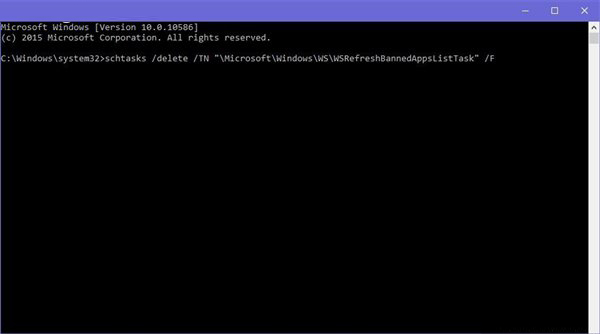
一鍵修復指令(管理員 CMD/PowerShell)

schtasks /delete /TN "\Microsoft\Windows\WS\WSRefreshBannedAppsListTask" /F
  1. 右鍵開始 →「命令提示字元(系統管理員)」或「Windows PowerShell(系統管理員)」。
  2. 貼上上述指令按 Enter,任務刪除成功。

此為暫時性修復,微軟 Gabriel Aul 未公開根因說明,預期下版本預覽版內建修正。若後續版本復發,再執行一次指令即可。

Copyright © Windows教程網 All Rights Reserved