Windows XP Windows 7 Windows 2003 Windows Vista Windows 綜合教學 Linux 系統教學
Windows 10 Windows 8 Windows 2008 Windows NT Windows Server 電腦軟體教學

Win7 刪除自動下載的 Win10 升級檔案,釋放 C 槽空間

編輯:Win10 系統應用技巧

微軟透過 Windows Update 自動下載 Win10 升級檔案,許多 Win7 用戶不知情下佔用數 GB C 槽空間。若不打算升級,刪除這些暫存檔能有效回收磁碟空間。本文提供兩種安全刪除方法。

方法一:手動刪除軟體發佈快取資料夾

  1. 開啟檔案總管,前往路徑:C:\Windows\SoftwareDistribution\Download
  2. 刪除該資料夾內所有檔案與子資料夾。

說明:SoftwareDistribution\Download 是 Windows 更新的暫存快取目錄,刪除其中內容不影響系統運作,下次更新會自動重新下載。
方法二:使用內建「磁碟清理」工具

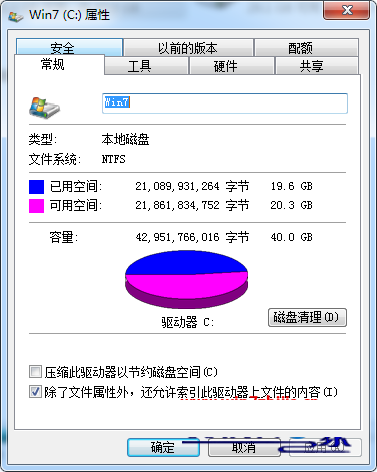
  1. 滑鼠右鍵點擊 C 槽 → 選擇「內容」 → 點擊「磁碟清理」。
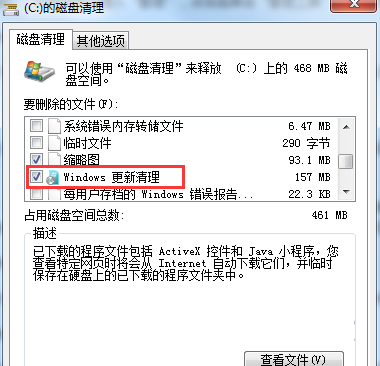
  2. 系統掃描完成後,勾選「Windows 更新清理」(或舊版顯示的「Windows 更新」),確定執行清理。

磁碟清理介面
勾選 Windows 更新清理

補充建議

兩種方法皆可有效清除已下載的 Win10 升級檔。若未來決定升級,Windows Update 會自動重新下載。建議在 Win10 正式版釋出前,謹慎評估是否安裝預覽版,以免遇到相容性問題。

Copyright © Windows教程網 All Rights Reserved