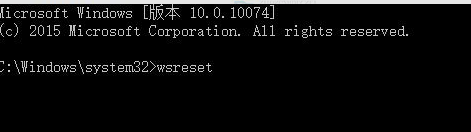
Microsoft Store 安裝應用失敗、錯誤代碼、閃退,多為本地快取損毀。內建 wsreset.exe 可清除快取並自動重啟商店,修復大多數問題。
wsreset.exe
wsreset
Get-AppXPackage -AllUsers | Foreach {Add-AppxPackage -DisableDevelopmentMode -Register "$($_.InstallLocation)\AppXManifest.xml"}
Win10 檔案總管閃退怎麼辦?移除最近更新補丁快速修復
Win 10 應用程式視窗切換全螢幕模式教學(以應用商店為例)
Win10 升級後多出一個 450MB「復原分區」怎麼辦?能不能刪除?完整解析
Win10 將 IE 設為預設瀏覽器兩法:控制台「預設程式」/ 設定 App「預設應用程式」
Windows 10 免費版真的划算嗎?專家分析利弊
Win8.1 升級 Win10 詳細步驟圖解:從 ISO 掛載到安裝完成
Win10 檔案總管找回「收藏夾」:匯入註冊表檔恢復經典導覽列功能
Windows 10 正式版六大核心新功能深度解析