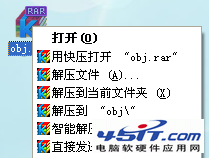
開啟 WinRAR → 定位損壞檔案 → 選中 → 工具列「修復」按鈕(英文版 Repair) → 選擇 ZIP 或 RAR 類型 → 確定,自動嘗試修復。
.mp3
WinRAR壓縮包加密與安全技巧大全:6大隱藏功能提升文件保密等級
Ctrl+Y 恢復上一步操作:撤銷的反向鍵,別讓誤操作毀了你的內容
FDISK 隱藏參數大全:/ACTOK 跳過壞軌、/MBR 重寫引導、/Q 免重開機、/CMBR 指定磁碟等 13 個實用開關
VMware Workstation 三大網卡模式深度解析:Bridged/NAT/Host-Only 選型指南
EasyBoot 應用實例:Windows NT/2000 啟動光碟製作、PID 修改免序列號、ISO 參數設定
Ghost 硬碟克隆 3 大實戰心得:新版本優先、目標盤勿預分區、主從設定影響鏡像讀取
ADSL 優化大師:國產網優神器,四維加速突破運營商限制
智慧狂拼輸入法 6 大實用技巧:快速改詞、模糊音、文本轉碼、上網導航、智慧學習、省略韻母