故障現象
Chrome 更新後(版本 22.0.1221.0 dev-m),大部分頁面上方出現三角形灰色遮擋層,捲動閃爍,超連結可點擊但視覺嚴重受阻。IE9 正常,確為 Chrome 問題。

排查過程
- 觀察:僅含 Flash 內容的頁面出現遮擋,無 Flash 頁面正常。
- Chrome 任務管理器(標籤欄右鍵 → 任務管理器)逐一結束 Flash 相關進程 → 遮擋消失,確為 Flash 插件問題。
- 進入
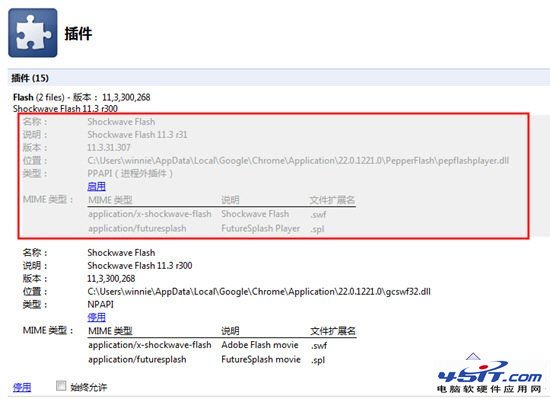
chrome://plugins/ → 顯示兩組 Flash 插件(不同類型/版本)。
- 分別停用測試:停用第一組(較舊/系統級)可消除遮擋,且不影響正常 Flash 播放(線上視頻等)。

解決方案
在 chrome://plugins/ 中找到 Flash 插件列表,**停用第一項(通常為 PepperFlash 或系統級 NPAPI 版本)**,保留第二項啟用。重新整理頁面,遮擋層消失,Flash 功能正常。
本質與後續
- 此為 Chrome 開發版內建 Flash 衝突 Bug,臨時規避方案。
- 根治需等待 Chrome 穩定版更新內建 Flash 組件。
- 現代 Chrome 已移除 Flash 支援,此問題歷史意義大於實用。