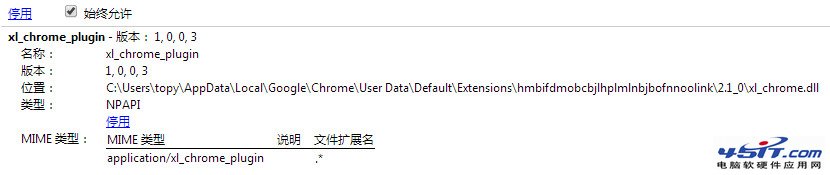
Chrome 更新後頻繁彈出 xl_chrome_plugin 權限請求,依官方說明操作即可永久允許:
xl_chrome_plugin
chrome://plugins
無需每次點選「允許一次」或「在此網站永遠允許」,徹底消除干擾。
網易泡泡共享資料夾:節省硬碟空間、方便好友互取檔案
如何查看 IE 瀏覽器版本?兩大經典方法與各版本介面對照圖
什麼是支付寶擔保交易?流程、安全性與注意事項完整說明
修改 IE 下載檔案後的預設處理動作:以 RAR 為例
微信傳送地理位置完整教學:輕鬆分享所在位置
IE 瀏覽器實現文字檔案簡易加密:變身亂碼防窺視
Maxthon 快捷組三大小技:單一連結開啟、啟動自動開最愛、追加網址到既有組
網頁 Flash 不顯示?完整排查與修復指南 (IE 設定、登錄檔、外掛重裝)