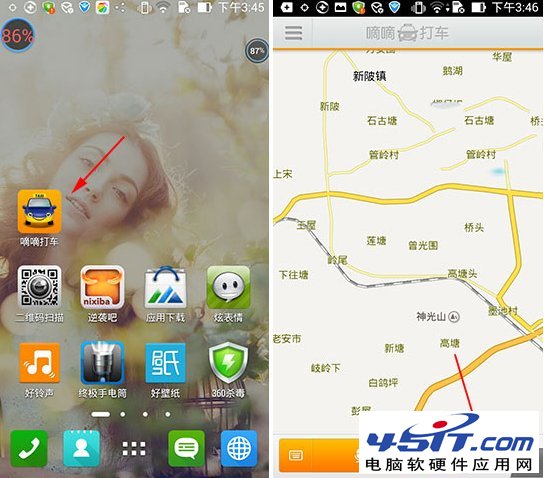
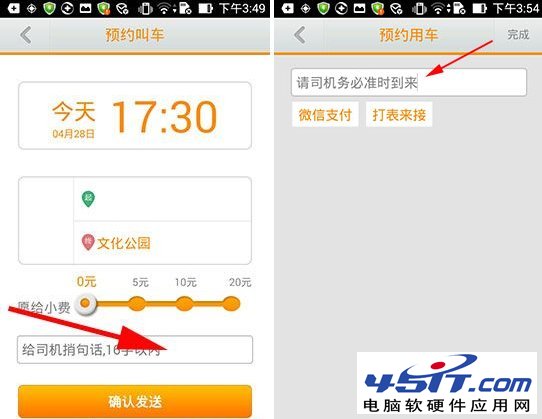
嘀嘀打車「訂單附加資訊」功能可預填備註、綁定微信支付,提升叫車效率:
新版還支援微信支付綁定,下車直接支付無需現金找零。
Outlook Express 無法寄信「找不到主機 smtp.163.com」?多半是拼字錯誤!
阿里旺旺聊天記錄如何刪除?徹底清除本地資料夾位置指南
Foxmail 設定自動收信與新郵件聲音提醒圖文教程
BitTorrent (BT) 完整使用指南:原理、操作與下載技巧
快速尋找 Google 可用 Hosts IP 教學:Ping/Telnet 測試 + 手動修改 Hosts 檔
網路電視三國演義:PPMate、PPLive、PPStream 界面、功能、頻道深度橫向評測
迅雷小技巧:設定「任務完成」為「開啟目錄」,下載完自動彈出資料夾
IE9 登入交通銀行網銀無法輸入密碼?兩大解決方案圖文教學