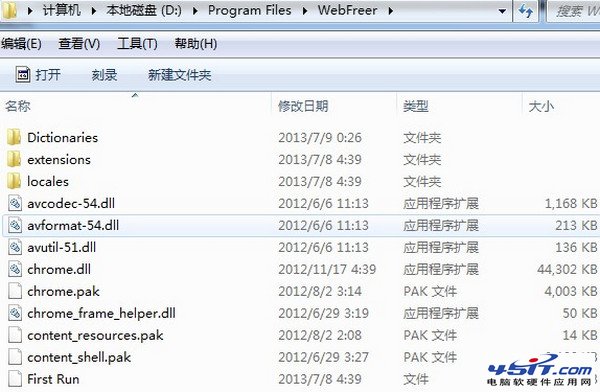
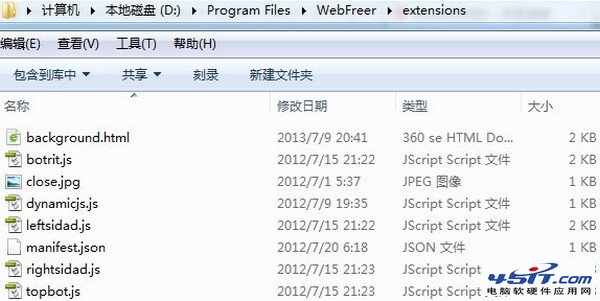
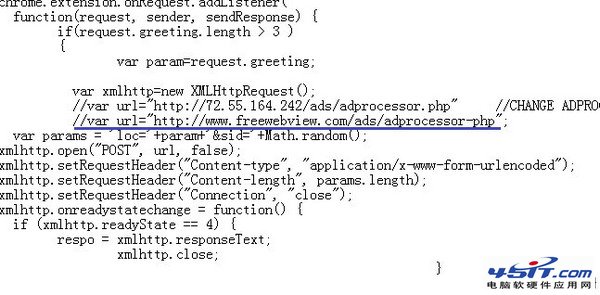
WebFreer 瀏覽器無內建去廣告功能,可透過修改擴充套件檔案實現:
extensions
background.html
//
.html
-html
重啟瀏覽器後廣告將不再載入。注意:瀏覽器更新可能覆蓋修改,需重複操作。
Foxmail 設定完整教學:新增帳號、收發信、進階參數、常見問題一次搞定
MSN 相簿下載照片為縮圖無法還原?請對方上傳「原始尺寸」或改用郵件傳送
網路螞蟻無法監控下載?開啟監視功能與路徑檢查
IE 瀏覽器莫名「跳窗」故障的修復方法
微信驗證碼是什麼?觸發條件、作用機制與三種解決「頻繁驗證」方案
Outlook 撤回已寄出錯誤郵件:條件與步驟完整說明
Foxmail 黑名單自動過濾刪除垃圾郵件
像 QQ 一樣給 MSN 加永久群:群易網一分鐘建立、支援 300 人、網頁管理