現象:全螢幕卡頓近死機,瀏覽頁面頻彈「Adobe Flash 錯誤:ActionScript 錯誤」。
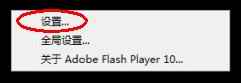
播放視窗右鍵→「設定」→ 取消勾選「啟用硬體加速」。
副作用:畫質可能下降。
本質為 Flash 版本過舊 Bug。下載安裝新版:Adobe 官方下載 或用附件 10.1.82.76 版安裝包。
一勞永逸解決全螢幕卡頓、死機、Flash 報錯三合一!
PC 端 DVD 播放疑難雜症全解析:複製、字幕、區碼、書籤、分級、循環播放
Winavi轉碼RMVB轉MPG無聲?RealPlayer 11與暴風影音3解碼器衝突
MTS/M2TS 格式詳解:索尼高清攝影機原生格式、轉檔編碼與行動裝置適用指南
CF 遊戲 FPS 不穩優化全攻略:驅動更新、桌面優化、虛擬記憶體、魯大師一鍵加速
DVDscr 版電影是什麼?畫質特點、水印與法律風險全解析
ACDSee 批量重命名與縮圖尺寸修改圖文教學:Ctrl+G 快捷鍵、調整圖片大小功能全解
PDF 開啟自動顯示書籤面板:Acrobat 初始檢視設定一步到位
光影魔術手修復數碼照片全攻略:從導入到批量處理