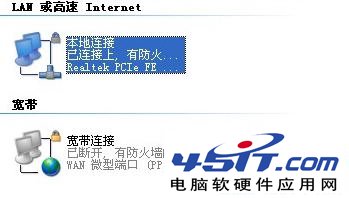
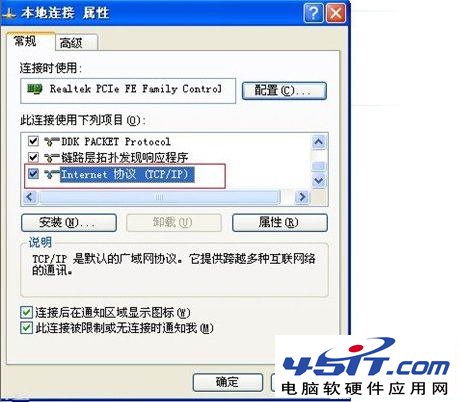
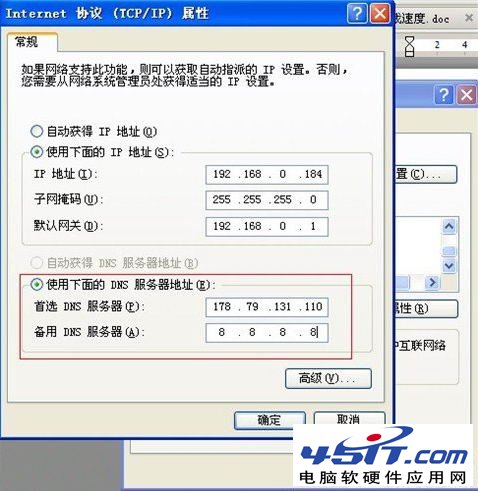
DNS 伺服器設為 178.79.131.110(主),備用 8.8.8.8(Google DNS),即可大幅加速 App Store 下載。
178.79.131.110
8.8.8.8
操作邏輯相同,介面略異。設定完成後在 iTunes 下載 App 即可體驗加速效果。
千千靜聽與KMPlayer自帶原唱消音功能讓你隨時K歌
AutoCAD 字體庫安裝完整指南:標準字體與大字體安裝路徑詳解
MSN 安全必備:一鍵舉報好友帳號被盜,淨化網絡環境
Cydia 安裝中斷報錯「dpkg was interrupted」?3 步強制修復教學
F4V 格式詳解:高清時代的 FLV 繼任者,支援 H.264、相容播放與副檔名技巧
PDF 內容修改完全指南:從 Acrobat 專業編輯到免費替代方案實測
電腦提示「未安裝兼容 DVD 解碼器」解決方案
NEF 格式開啟指南:尼康 RAW 專用軟體 Capture NX-D、避坑光影魔術手偏色問題