IE11 新的 User Agent 字串含 Gecko 關鍵字,導致許多舊版網銀、企業內部系統誤判為 Firefox 而拒絕存取。透過群組原則自訂 User Agent 可恢復相容性。
設定步驟
- Win+R 輸入
gpedit.msc 開啟本機群組原則編輯器。
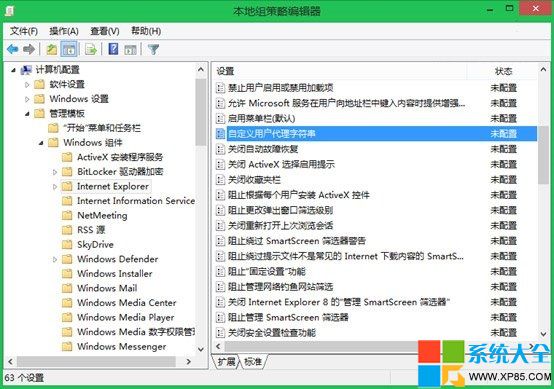
- 依序展開:電腦設定 > 系統管理範本 > Windows 元件 > Internet Explorer。
- 右側雙擊 自訂使用者代理程式字串,選 已啟用。
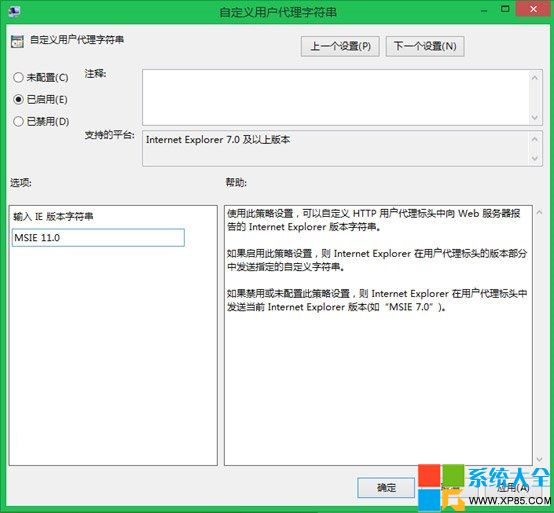
- 在輸入框填入欲偽裝的版本字串,例如:
MSIE 11.0(維持 IE11 身分但移除 Gecko)
或 MSIE 10.0、MSIE 9.0、MSIE 8.0 等舊版本。
- 確定,關閉群組原則編輯器,重新開啟 IE11 即生效。
此設定為機器層級,影響所有使用者。若需使用者層級設定,諈在「使用者設定」對應路徑操作。